Zero-Copy Parquet Lakehouses: Ingesting IoT Telemetry with Apache Iceberg
Eliminate Hive directory bottlenecks and small-file chaos: ACID snapshot trees, automated asynchronous compaction, hidden partitioning, and zero-copy multi-engine analytics.
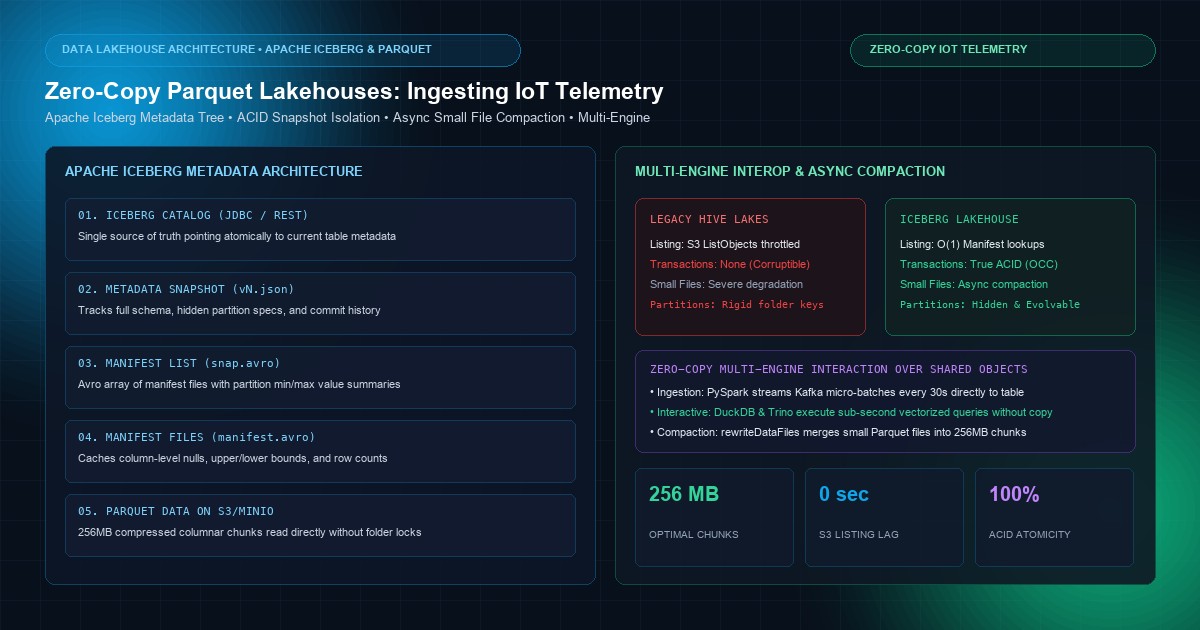
High-throughput industrial Internet of Things (IoT) deployments—spanning connected vehicular telematics, smart energy grid meters, robotic manufacturing lines, and automated cold-chain logistics—generate tens of billions of time-stamped events daily. Historically, data platform architects faced an agonizing architectural compromise: pay exorbitant fees for proprietary cloud data warehouses (e.g., Snowflake or BigQuery) to achieve fast query response times, or dump raw columnar files into cheap object storage (Amazon S3, Google Cloud Storage, or MinIO) using traditional Apache Hive-style partitioning, only to suffer from crippling query latencies, read inconsistencies, and metadata catalog collapse.
The root of this historical breakdown lies in the Apache Hive metastore model. In Hive, tables are defined by rigid directory paths (s3://bucket/table/year=2026/month=10/day=03/hour=14/). As data grows to billions of files, simple directory listing operations (ListObjectsV2 on S3) take minutes just to identify which files to read, while concurrent writes frequently corrupt read operations.
The modern solution is the Open Table Format, led by Apache Iceberg. Iceberg decouples table metadata completely from object storage directory hierarchies, tracking individual immutable Parquet files via an acyclic metadata snapshot tree.
This guide provides an end-to-end technical blueprint for architecting a Zero-Copy Parquet Lakehouse for IoT telemetry ingestion using Apache Iceberg. We analyze the metadata tree architecture, demonstrate ACID snapshot isolation on object storage, solve the dreaded "small file problem" via automated asynchronous compaction, and evaluate multi-engine interop across PySpark, DuckDB, and Trino.
The Collapse of the Hive Lake Model: Directory Trees vs. Metadata Snapshots#
To understand why Apache Iceberg has become the de facto lakehouse standard, one must contrast its file-tracking mechanics with legacy Hive-style data lakes.
                          LEGACY HIVE-STYLE DATA LAKE (BRITTLE)
  s3:400 font-semibold">class=400 font-semibold">class="text-emerald-300">"text-slate-500 italic">//lake/iot_telemetry/
  ├── year=2026/month=10/day=03/
  │   ├── part-00001.parquet  <-- Query planner must list ENTIRE directory tree
  │   ├── part-00002.parquet  <-- S3 ListObjects throttles at 1,000 keys per call
  │   └── part-00003.parquet  <-- Concurrent write causes partial read inconsistency

                        APACHE ICEBERG METADATA TREE (ACID & ZERO-COPY)
                          [ Iceberg Catalog (JDBC / REST / Nessie) ]
                                             │ Points to Current Metadata
                                             ▼
                             [ v3.metadata.json (Table Snapshot) ]
                                             │
                                             ▼
                              [ snap-84192.avro (Manifest List) ]
                              ├── Manifest File 1 (Partition: Day=03, Min/Max stats)
                              │   ├── data_file_a.parquet (Row count: 500k, Offsets)
                              │   └── data_file_b.parquet (Row count: 500k, Offsets)
                              └── Manifest File 2 (Partition: Day=02, Min/Max stats)
                                  └── data_file_c.parquet
The Three Structural Flaws of Hive Partitioning#
- The S3 Directory Listing Penalty: In cloud object storage, there is no physical concept of a "folder" or "directory." An object path is merely a key string. Listing 500,000 files in an S3 prefix requires 500 sequential
ListObjectsV2HTTP requests, consuming 30 to 120 seconds of pure latency before a query engine (such as Trino or Spark) can read a single Parquet byte. - Lack of True ACID Transactions: When a streaming ingestion job writes Parquet files to an S3 folder, a concurrent query will read partially written files or miss files entirely. True atomic commit semantics (
renameoperations) do not exist on object storage; S3COPY + DELETEemulation is non-atomic and painfully slow. - Partition Locking: Hive requires users to know the physical folder layout in their SQL queries (
WHERE year=2026 AND month=10). If data architects later decide to partition by day instead of hour, the entire dataset must be physically rewritten to disk.
Apache Iceberg Architecture: The Snapshot Tree#
Apache Iceberg replaces folder-based metadata with an acyclic hierarchical metadata tree consisting of four distinct layers:
1. The Iceberg Catalog#
The catalog acts as the single source of truth for the current pointer to the table's state. It stores a single key-value reference:(table_name -> current_metadata_location). Catalogs can be backed by a relational database (PostgreSQL via JDBC), an Iceberg REST Catalog, AWS Glue, or Git-like versioned catalogs such as Project Nessie.2. The Table Metadata File (vN.metadata.json)#
Every schema evolution, partition change, or data commit produces a new immutable table metadata JSON file. This file contains:- The complete table schema (field IDs, types, documentation).
- Partition specifications (including hidden partition transforms).
- A log of historical snapshots (enabling Time Travel queries).
- Pointer to the current active snapshot ID.
3. The Manifest List (snap-[id].avro)#
A manifest list represents a specific table snapshot. Written in compact Avro binary format, it lists all Manifest Files that compose the snapshot. Crucially, each entry in the manifest list contains partition field summaries (minimum and maximum bounds of partition keys). Query engines read the manifest list and prune 90% of manifest files without touching the underlying data files.4. Manifest Files & Data Files (manifest-[id].avro and .parquet)#
A manifest file lists individual Parquet data files along with detailed column-level metrics:- Row counts per file.
- Null value counts.
- Lower and upper value bounds for every primitive column.
- Physical file size and split offsets.
Because of this metric caching, if a query requests WHERE vehicle_id = 'VIN_881920', the query engine inspects the manifest's column upper/lower bounds in RAM and discards 99.9% of Parquet files without ever issuing an HTTP GET request to S3.
Solving the "Small File Problem": In-Flight Streaming & Asynchronous Compaction#
In IoT architectures, telemetry arrives in continuous high-frequency streams via Kafka or MQTT. If streaming engines commit micro-batches every 5 seconds directly to object storage, they generate hundreds of thousands of tiny 50 KB Parquet files. This is the Small File Catastrophe:
- Parquet compression algorithms (Snappy, Zstd) require 128 MB to 512 MB file chunks to build optimal dictionary and dictionary-page encodings.
- Reading 100,000 tiny files floods the operating system and cloud storage with millions of HTTP connection handshakes, destroying query throughput.
                          STREAMING INGESTION & COMPACTION CYCLE
  IoT Sensor Mesh
        │ (Kafka Events)
        ▼
  [ PySpark Streaming Ingestion ]
        │ Commits small 2MB - 10MB Parquet files every 15s to keep latency low
        ▼
  [ Iceberg Table (Active Ingestion Snapshot) ] <── Query Engines Read Instantly!
        │
        ▼ (Asynchronous Background Maintenance)
  [ Iceberg Spark Rewrite Compactor ]
        │ Merges thousands of 5MB files into dense 256MB Parquet chunks
        │ Commits atomic snapshot replace (Zero read locks, zero query interruption)
        ▼
  [ Optimized Iceberg Table (Compact Parquet) ]
PySpark Streaming Ingestion Implementation#
The following PySpark streaming application ingests sensor telemetry from Kafka, transforms the payload, and commits micro-batches into an Apache Iceberg table:
400 font-semibold">import os
400 font-semibold">from pyspark.sql 400 font-semibold">import SparkSession
400 font-semibold">from pyspark.sql.functions 400 font-semibold">import col, from_json, to_timestamp
400 font-semibold">from pyspark.sql.types 400 font-semibold">import (
    StructType, StructField, StringType,
    DoubleType, LongType, IntegerType
)

400 font-semibold">class=400 font-semibold">class="text-emerald-300">"text-slate-500 italic"># Initialize Spark with Iceberg and S3/MinIO connectors
spark = SparkSession.builder \
    .appName(400 font-semibold">class="text-emerald-300">"IoT-Iceberg-Ingest") \
    .config(400 font-semibold">class="text-emerald-300">"spark.sql.extensions", 400 font-semibold">class="text-emerald-300">"org.apache.iceberg.spark.extensions.IcebergSparkSessionExtensions") \
    .config(400 font-semibold">class="text-emerald-300">"spark.sql.catalog.lakehouse", 400 font-semibold">class="text-emerald-300">"org.apache.iceberg.spark.SparkCatalog") \
    .config(400 font-semibold">class="text-emerald-300">"spark.sql.catalog.lakehouse.400 font-semibold">type", 400 font-semibold">class="text-emerald-300">"jdbc") \
    .config(400 font-semibold">class="text-emerald-300">"spark.sql.catalog.lakehouse.uri", 400 font-semibold">class="text-emerald-300">"jdbc:postgresql:400 font-semibold">class="text-slate-500 italic400 font-semibold">class="text-emerald-300">">//postgres-catalog:5432/iceberg_metadata") \
    .config(400 font-semibold">class="text-emerald-300">"spark.sql.catalog.lakehouse.jdbc.user", 400 font-semibold">class="text-emerald-300">"iceberg_user") \
    .config(400 font-semibold">class="text-emerald-300">"spark.sql.catalog.lakehouse.jdbc.password", 400 font-semibold">class="text-emerald-300">"secret_pass") \
    .config(400 font-semibold">class="text-emerald-300">"spark.sql.catalog.lakehouse.warehouse", 400 font-semibold">class="text-emerald-300">"s3a:400 font-semibold">class="text-slate-500 italic400 font-semibold">class="text-emerald-300">">//iot-telemetry-lakehouse/warehouse/") \
    .config(400 font-semibold">class="text-emerald-300">"spark.sql.catalog.lakehouse.io-impl", 400 font-semibold">class="text-emerald-300">"org.apache.iceberg.aws.s3.S3FileIO") \
    .config(400 font-semibold">class="text-emerald-300">"spark.sql.catalog.lakehouse.s3.endpoint", 400 font-semibold">class="text-emerald-300">"https:400 font-semibold">class="text-slate-500 italic400 font-semibold">class="text-emerald-300">">//s3.us-east-1.amazonaws.com") \
    .config(400 font-semibold">class="text-emerald-300">"spark.sql.defaultCatalog", 400 font-semibold">class="text-emerald-300">"lakehouse") \
    .getOrCreate()

400 font-semibold">class=400 font-semibold">class="text-emerald-300">"text-slate-500 italic"># Create Iceberg Table with Hidden Partitioning
spark.sql(400 font-semibold">class="text-emerald-300">""400 font-semibold">class="text-emerald-300">"
400 font-semibold">CREATE 400 font-semibold">TABLE IF NOT EXISTS lakehouse.telemetry.device_readings (
    device_uuid STRING,
    event_timestamp TIMESTAMP,
    firmware_version STRING,
    latitude DOUBLE,
    longitude DOUBLE,
    battery_level FLOAT,
    core_temperature DOUBLE,
    error_flags INT
)
USING iceberg
PARTITIONED BY (days(event_timestamp), bucket(16, device_uuid))
TBLPROPERTIES (
    'write.format.400 font-semibold">default' = 'parquet',
    'write.parquet.compression-codec' = 'zstd',
    'write.parquet.compression-level' = '7',
    'write.target-file-size-bytes' = '268435456' -- 256 MB Target File Size
)
"400 font-semibold">class="text-emerald-300">"")

400 font-semibold">class=400 font-semibold">class="text-emerald-300">"text-slate-500 italic"># Define Kafka Payload Schema
telemetry_schema = StructType([
    StructField(400 font-semibold">class="text-emerald-300">"device_uuid", StringType(), False),
    StructField(400 font-semibold">class="text-emerald-300">"timestamp", StringType(), False),
    StructField(400 font-semibold">class="text-emerald-300">"firmware_version", StringType(), True),
    StructField(400 font-semibold">class="text-emerald-300">"latitude", DoubleType(), True),
    StructField(400 font-semibold">class="text-emerald-300">"longitude", DoubleType(), True),
    StructField(400 font-semibold">class="text-emerald-300">"battery_level", DoubleType(), True),
    StructField(400 font-semibold">class="text-emerald-300">"core_temperature", DoubleType(), True),
    StructField(400 font-semibold">class="text-emerald-300">"error_flags", IntegerType(), True),
])

400 font-semibold">class=400 font-semibold">class="text-emerald-300">"text-slate-500 italic"># Stream 400 font-semibold">from Kafka
kafka_stream = spark.readStream \
    .format(400 font-semibold">class="text-emerald-300">"kafka") \
    .option(400 font-semibold">class="text-emerald-300">"kafka.bootstrap.servers", 400 font-semibold">class="text-emerald-300">"kafka-broker:9092") \
    .option(400 font-semibold">class="text-emerald-300">"subscribe", 400 font-semibold">class="text-emerald-300">"telemetry.sensors.raw") \
    .option(400 font-semibold">class="text-emerald-300">"startingOffsets", 400 font-semibold">class="text-emerald-300">"latest") \
    .load()

400 font-semibold">class=400 font-semibold">class="text-emerald-300">"text-slate-500 italic"># Parse JSON and Format Datatypes
parsed_df = kafka_stream.select(
    from_json(col(400 font-semibold">class="text-emerald-300">"value").cast(400 font-semibold">class="text-emerald-300">"400">string"), telemetry_schema).alias(400 font-semibold">class="text-emerald-300">"data")
).select(
    col(400 font-semibold">class="text-emerald-300">"data.device_uuid"),
    to_timestamp(col(400 font-semibold">class="text-emerald-300">"data.timestamp")).alias(400 font-semibold">class="text-emerald-300">"event_timestamp"),
    col(400 font-semibold">class="text-emerald-300">"data.firmware_version"),
    col(400 font-semibold">class="text-emerald-300">"data.latitude"),
    col(400 font-semibold">class="text-emerald-300">"data.longitude"),
    col(400 font-semibold">class="text-emerald-300">"data.battery_level"),
    col(400 font-semibold">class="text-emerald-300">"data.core_temperature"),
    col(400 font-semibold">class="text-emerald-300">"data.error_flags")
)

400 font-semibold">class=400 font-semibold">class="text-emerald-300">"text-slate-500 italic"># Stream Append to Iceberg with 30-Second Micro-Batches
query = parsed_df.writeStream \
    .format(400 font-semibold">class="text-emerald-300">"iceberg") \
    .outputMode(400 font-semibold">class="text-emerald-300">"append") \
    .trigger(processingTime=400 font-semibold">class="text-emerald-300">"30 seconds") \
    .option(400 font-semibold">class="text-emerald-300">"checkpointLocation", 400 font-semibold">class="text-emerald-300">"s3a:400 font-semibold">class="text-slate-500 italic400 font-semibold">class="text-emerald-300">">//iot-telemetry-lakehouse/checkpoints/sensors/") \
    .toTable(400 font-semibold">class="text-emerald-300">"lakehouse.telemetry.device_readings")

query.awaitTermination()
Automated Asynchronous Compaction Routine#
To ensure that small 30-second ingestion files do not accumulate, an automated compaction job runs periodically (e.g., every 60 minutes). It invokes Iceberg's native Spark rewriteDataFiles action, bin-packing files into 256 MB targets and sorting rows by event_timestamp to optimize range scans:
400 font-semibold">from org.apache.iceberg.spark.actions 400 font-semibold">import SparkActions

400 font-semibold">class=400 font-semibold">class="text-emerald-300">"text-slate-500 italic"># Compact small Parquet files into 256MB blocks
400 font-semibold">class=400 font-semibold">class="text-emerald-300">"text-slate-500 italic"># This executes atomically: Readers continue reading old snapshots until commit finishes!
spark_actions = SparkActions.get(spark)

compaction_result = spark_actions.rewriteDataFiles(400 font-semibold">class="text-emerald-300">"lakehouse.telemetry.device_readings") \
    .binPack() \
    .option(400 font-semibold">class="text-emerald-300">"target-file-size-bytes", 400 font-semibold">class="text-emerald-300">"268435456") \  400 font-semibold">class=400 font-semibold">class="text-emerald-300">"text-slate-500 italic"># 256 MB
    .option(400 font-semibold">class="text-emerald-300">"min-file-size-bytes", 400 font-semibold">class="text-emerald-300">"67108864") \     400 font-semibold">class=400 font-semibold">class="text-emerald-300">"text-slate-500 italic"># 64 MB minimum
    .option(400 font-semibold">class="text-emerald-300">"max-file-group-size-bytes", 400 font-semibold">class="text-emerald-300">"10737418240") \ 400 font-semibold">class=400 font-semibold">class="text-emerald-300">"text-slate-500 italic"># 10 GB grouping
    .execute()

print(f400 font-semibold">class="text-emerald-300">"Compaction Complete! Rewritten files count: {compaction_result.rewrittenDataFilesCount()}")
Hidden Partitioning and Partition Evolution#
In traditional systems, if a query developer forgets to include year, month, and day in a query, the system triggers a full table scan across the entire multi-terabyte data lake.
Why Hidden Partitioning Changes Everything#
Apache Iceberg implements Hidden Partitioning. Partition transforms (such as days(event_timestamp), hours(event_timestamp), or bucket(16, device_uuid)) are tracked within table metadata.
- User Transparent Queries: The user writes natural, standard SQL:
   400 font-semibold">SELECT * 400 font-semibold">FROM device_readings
   400 font-semibold">WHERE event_timestamp >= 400 font-semibold">class="text-emerald-300">'2026-10-01 00:00:00'
     AND event_timestamp < 400 font-semibold">class="text-emerald-300">'2026-10-02 00:00:00';
- Automatic Metadata Pruning: The query planner automatically applies the
days()transform to the filter predicate, derivesdate_id = 20727, and queries only the manifest files matching that day partition. - Partition Evolution Without Data Rewrites: If the data volume triples and the engineering team needs to switch from daily partitions to hourly partitions, they run:
   400 font-semibold">ALTER 400 font-semibold">TABLE lakehouse.telemetry.device_readings
   SET PARTITION SPEC (hours(event_timestamp), bucket(16, device_uuid));
Iceberg updates the table metadata immediately. Historical files remain untouched in daily layouts, while newly ingested files follow the hourly layout. Query planners transparently split queries across both partition specifications without error.
Zero-Copy Multi-Engine Analytics: PySpark, Trino, and DuckDB#
Because Apache Iceberg stores data in standardized Apache Parquet files backed by open Avro metadata specifications, multiple disparate query engines can query the exact same data lake simultaneously with zero ETL replication:
                            ZERO-COPY MULTI-ENGINE INTEROP
                                          │
                     ┌────────────────────┼────────────────────┐
                     ▼                    ▼                    ▼
             [ Trino SQL Engine ]  [ PySpark Cluster ]   [ Embedded DuckDB ]
             Interactive BI & Ad-   Batch ETL & Machine   Sub-Second CLI &
             Hoc Lakehouse Queries  Learning Pipelines   In-Memory Analytics
                     │                    │                    │
                     └────────────────────┼────────────────────┘
                                          ▼
                      [ Shared Apache Iceberg Table Metadata ]
                                          │
                                          ▼
                      [ Raw Parquet Files on AWS S3 / MinIO ]
High-Speed Interactive Analytics with DuckDB#
Engineers can run local, sub-second analytical queries directly against the Iceberg lakehouse using DuckDB without spinning up a heavy distributed Spark cluster:
400 font-semibold">import duckdb

400 font-semibold">class=400 font-semibold">class="text-emerald-300">"text-slate-500 italic"># Connect in-memory DuckDB instance
con = duckdb.connect()

400 font-semibold">class=400 font-semibold">class="text-emerald-300">"text-slate-500 italic"># Install and load Iceberg extension
con.execute(400 font-semibold">class="text-emerald-300">"INSTALL iceberg; LOAD iceberg;")
con.execute(400 font-semibold">class="text-emerald-300">"INSTALL httpfs; LOAD httpfs;")

400 font-semibold">class=400 font-semibold">class="text-emerald-300">"text-slate-500 italic"># Configure S3 credentials
con.execute(400 font-semibold">class="text-emerald-300">""400 font-semibold">class="text-emerald-300">"
SET s3_region='us-east-1';
SET s3_access_key_id='AKIA...';
SET s3_secret_access_key='...';
"400 font-semibold">class="text-emerald-300">"")

400 font-semibold">class=400 font-semibold">class="text-emerald-300">"text-slate-500 italic"># Directly query Iceberg table via metadata snapshot
query_sql = 400 font-semibold">class="text-emerald-300">""400 font-semibold">class="text-emerald-300">"
400 font-semibold">SELECT
    date_trunc('hour', event_timestamp) AS hour_window,
    count(*) AS telemetry_events,
    avg(core_temperature) AS avg_temp,
    max(core_temperature) AS peak_temp
400 font-semibold">FROM iceberg_scan('s3:400 font-semibold">class="text-slate-500 italic400 font-semibold">class="text-emerald-300">">//iot-telemetry-lakehouse/warehouse/telemetry/device_readings',
                  version => 'latest')
400 font-semibold">WHERE event_timestamp >= NOW() - INTERVAL '24 hours'
400 font-semibold">GROUP BY 1
400 font-semibold">ORDER BY 1 DESC;
"400 font-semibold">class="text-emerald-300">""

df_result = con.execute(query_sql).df()
print(df_result.head(10))
DuckDB reads the metadata manifest, downloads only the required Parquet byte ranges over HTTP range requests, and executes vectorized analytical SQL locally in milliseconds.
Lifecycle Management: Snapshot Expiration and Orphan File Cleanup#
While immutable snapshot isolation guarantees query consistency and time travel, retaining historical snapshots indefinitely triggers rapid storage accumulation on cloud object storage. In high-velocity IoT pipelines generating tens of thousands of commits daily, table maintenance routines must periodically expire old snapshots and purge orphaned files.
1. Snapshot Expiration (expireSnapshots)#
When a snapshot expires, Iceberg identifies Parquet data files that are no longer referenced by any remaining active or historical snapshot and deletes them from S3/MinIO:
400 font-semibold">from datetime 400 font-semibold">import datetime, timedelta

400 font-semibold">class=400 font-semibold">class="text-emerald-300">"text-slate-500 italic"># Retain only 7 days of historical snapshot time travel
retention_threshold = datetime.utcnow() - timedelta(days=7)
retention_timestamp_ms = int(retention_threshold.timestamp() * 1000)

spark_actions.expireSnapshots(400 font-semibold">class="text-emerald-300">"lakehouse.telemetry.device_readings") \
    .expireOlderThan(retention_timestamp_ms) \
    .retainLast(10) \  400 font-semibold">class=400 font-semibold">class="text-emerald-300">"text-slate-500 italic"># Always keep at least 10 recent snapshots
    .execute()
2. Purging Orphan Files (removeOrphanFiles)#
If a streaming worker crashes mid-write or network partitions cause abandoned multipart uploads on S3, unreferenced Parquet files can linger in storage. The deleteOrphanFiles action scans object storage and physically purges any file not recorded in the metadata catalog:
400 font-semibold">class=400 font-semibold">class="text-emerald-300">"text-slate-500 italic"># Purge abandoned files older than 3 days
orphan_threshold_ms = int((datetime.utcnow() - timedelta(days=3)).timestamp() * 1000)

spark_actions.deleteOrphanFiles(400 font-semibold">class="text-emerald-300">"lakehouse.telemetry.device_readings") \
    .olderThan(orphan_threshold_ms) \
    .execute()
Lakehouse Architecture Comparison Matrix#
| Architectural Feature | Apache Hive / S3 Folders | Delta Lake (Databricks) | Apache Iceberg |
|---|---|---|---|
| Metadata Mechanism | Directory path recursion | Transaction log JSON files (_delta_log) | Hierarchical Avro snapshot tree |
| Object Storage Optimization | Very Poor (ListObjects bottleneck) | Good (Log replay can slow on large tables) | Superior (O(1) Snapshot lookups) |
| Hidden Partitioning | No (Manual folder columns) | No (Generated columns required) | Yes (Native declarative transforms) |
| Partition Evolution | Impossible without full rewrite | Complex table migration | Zero-Copy Instantaneous Evolution |
| Multi-Engine Vendor Neutrality | High (Legacy standard) | Medium (Controlled primarily by Databricks) | Maximum (Apache Foundation, Trino/Snowflake/Spark) |
| Column-Level Min/Max Stats | Relies on Hive metastore | Stored in JSON transaction log | Stored in compact Avro manifests |
| Compaction Locking | Requires write downtime | Concurrent write support | Non-blocking atomic snapshot replace |
Conclusion & Strategic Architecture Roadmap#
Transitioning IoT telemetry infrastructure from fragile directory lakes or expensive data warehouses to an Apache Iceberg Parquet Lakehouse delivers massive economic and operational advantages:
- Decouple Storage from Compute: Retain 100% of your telemetry history on raw cloud object storage (S3/GCS) at $0.02/GB/month while maintaining sub-second query performance.
- Automate Compaction Early: Deploy an hourly or daily compaction job using Iceberg's
rewriteDataFilesaction to prevent streaming micro-batches from creating small-file performance degradation. - Empower Multi-Engine Flexibility: Let data scientists train machine learning models via PySpark, let business analysts run ad-hoc BI queries via Trino or Snowflake, and let backend microservices execute real-time checks via DuckDB—all querying the exact same Parquet files without duplicating a single byte of storage.
Frequently Asked Questions (FAQ)#
1. How does Apache Iceberg prevent data corruption during concurrent writes?#
Iceberg uses Optimistic Concurrency Control (OCC). When a writer creates a new snapshot, it checks if another process updated the current snapshot pointer in the catalog. If a conflict occurs (e.g., two processes modifying the exact same partitions), Iceberg retries the operation automatically against the newly committed snapshot or fails cleanly without leaving partial files visible to readers.2. What is the difference between Apache Iceberg and standard Apache Parquet?#
Apache Parquet is an open-source columnar file format designed for high-density storage and compression. Apache Iceberg is a table format that sits on top of Parquet files. Iceberg manages collections of Parquet files as a unified relational table, providing ACID transactions, metadata indexing, snapshot history, schema evolution, and hidden partitioning.3. Does compaction in Iceberg interrupt active real-time queries?#
No. Compaction in Apache Iceberg is completely non-blocking. The compaction process reads existing small Parquet files, writes optimized larger Parquet files, and commits an atomic snapshot update (replaceDataFiles). In-flight queries continue reading the older snapshot, while new queries automatically route to the optimized files once the commit succeeds.4. How does "Time Travel" work in an Iceberg lakehouse?#
Every commit in Iceberg produces an immutable snapshot ID with an exact UTC timestamp. Because underlying Parquet files are never overwritten in-place, query engines can execute time-travel queries (e.g.,SELECT * FROM table FOR SYSTEM_TIME AS OF '2026-10-01 12:00:00') by directing the catalog to load the historical metadata tree corresponding to that timestamp.5. What are the best practices for setting Parquet file sizes in Iceberg?#
For high-throughput analytical lakehouses queried by Trino, DuckDB, or Spark, the optimal target Parquet file size is 128 MB to 512 MB (configured viawrite.target-file-size-bytes = '268435456'). Files in this range provide enough row groups for effective dictionary and Zstandard compression while avoiding excessive memory allocation during parallel query planning.Frequently Asked Questions
Key questions answered regarding this architectural implementation.
Danisur Rahman
Lead AuthorPrincipal Distributed Systems Architect • KNetwork Systems
Principal architect specializing in enterprise distributed systems, edge caching, and hardware integration pipelines. Leads engineering audits, high-concurrency database optimizations, and zero-trust VPC deployments across high-growth ventures.
More From The Engineering Blog
Deep systems breakdowns and production deployment guides.
First-Party Attribution Engines: Reconciling Offline CRM Sales with Web CAPI
Bypass pixel loss and iOS privacy barriers: Architect server-side first-party attribution, stitch deterministic identity graphs, and sync offline CRM deals to Meta CAPI.
Building Real-Time OLAP Dashboards: ClickHouse vs. PostgreSQL Columnar Store
Sub-second analytical queries across 1 billion rows: MergeTree sparse indexing, vectorized SIMD execution, Hydra PostgreSQL columnar extensions, and Kafka ingestion.
Enjoyed this technical breakdown?
Subscribe to receive new architectural guides, system teardowns, and engineering benchmarks directly in your inbox.