Automating Mobile CI/CD: Fastlane Pipelines, Ephemeral Build Runners, and Automated Store Deployment
How to engineer zero-friction mobile deployment pipelines: Fastlane Match code signing with Git cryptography, Apple Silicon ephemeral macOS runners, DerivedData caching, and automated App Store and Google Play releases.
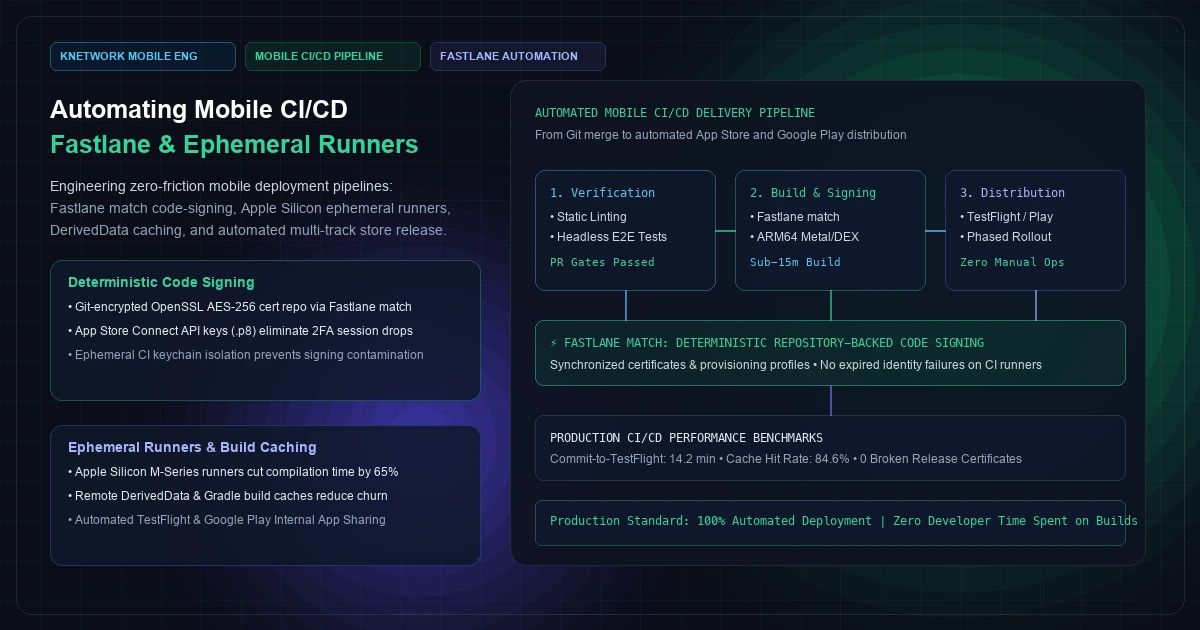
In modern web engineering, continuous integration and deployment (CI/CD) is a solved discipline. A software engineer merges a pull request to main, an ephemeral Linux container boots in three seconds, unit tests execute, a Docker image builds, and Kubernetes rolls out the release to production via blue-green or canary routing. The entire cycle finishes in under four minutes with zero human intervention.
In mobile engineering, CI/CD is frequently an operational quagmire.
Teams that deploy web backends twelve times a day often treat mobile releases as high-stress, bi-weekly rituals. A lead developer pauses all feature work for two days, pulls down certificates locally, runs into Xcode provisioning profile mismatches, wrestles with expired Apple developer identities, enters manual 2FA SMS codes to log into App Store Connect, manually generates release notes, and uploads massive 150MB .ipa and .aab binaries from their personal laptop over home Wi-Fi.
This manual paradigm is not just inefficient; it is structurally hazardous to enterprise software delivery:
- Signing Identity Drift: When developer certificates and mobile provisioning profiles are created ad-hoc across multiple developer machines, certificates expire silently, revocation cascades break active team builds, and CI runners fail unpredictably.
- The "Works on My Machine" Syndrome: Local Xcode and Android Studio builds mask build environment pollution, uncommitted local framework pods, dirty Gradle caches, and unsynchronized SDK versions.
- Release Latency: Inability to ship an emergency hotfix within 30 minutes because the only developer holding the production distribution signing key is on PTO.
Transforming mobile releases into a deterministic, zero-touch continuous deployment pipeline requires treating mobile infrastructure with the exact same rigor as cloud-native backends: ephemeral build runners, cryptographically synchronized code signing, multi-tiered artifact caching, and automated App Store and Google Play API distribution.
[Visual Asset: Architecture Schematic - Enterprise Mobile CI/CD Pipeline Lifecycle]
flowchart TD
    subgraph VCS ["Version Control & Trigger Tier"]
        G1["Git Push / PR Merge (Release Branch)"] --> G2["Automated Semantic Version Bump"]
        G2 --> G3["GitHub Actions Webhook Trigger"]
    end    subgraph CI_RUNNER ["Ephemeral Apple Silicon Runner (macOS arm64)"]
        R1["Isolated VM Provisioning (Ephemeral)"] --> R2["DerivedData & Gradle Remote Cache Pull"]
        R2 --> R3["Fastlane Match: Git-Crypt Sync"]
        R3 --> R4["Isolated Keychain Allocation"]
        R4 --> R5["Test Suite: Unit + Golden UI Tests"]
        R5 --> R6["Parallel Native Binary Compilation"]
        R6 --> R7["iOS Mach-O (.ipa)"]
        R6 --> R8["Android App Bundle (.aab)"]
    end    subgraph STORES ["Automated Distribution Tier"]
        S1["Apple App Store Connect API (.p8 JWT)"]
        S2["Google Play Developer Publishing API"]
        R7 -->|Automated Upload| S1
        R8 -->|Automated Upload| S2
        S1 --> S3["TestFlight Internal / External Tracks"]
        S2 --> S4["Google Play Internal App Sharing"]
        S3 --> S5["Automated Phased Release (1% -> 100%)"]
        S4 --> S5
    end    G3 --> R1
+---------------------------------------------------------------------------------------------------+
|                        ENTERPRISE MOBILE CI/CD ARCHITECTURAL TAXONOMY                             |
+---------------------------------+---------------------------------+-------------------------------+
| STAGE 1: CODE SIGNING & MATCH   | STAGE 2: EPHEMERAL COMPILATION  | STAGE 3: STORE API DEPLOYMENT |
+---------------------------------+---------------------------------+-------------------------------+
| Tooling:                        | Tooling:                        | Tooling:                      |
|   • Fastlane match              |   • GitHub Actions (macos-14)   |   • App Store Connect API     |
|   • Git-encrypted cert repo     |   • Gradle Remote Cache         |   • Google Play Publisher API |
|   • OpenSSL AES-256 cipher      |   • Tuist / DerivedData Cache   |   • Slack / Teams Webhooks    |
| Guarantees:                     | Guarantees:                     | Guarantees:                   |
|   • 100% deterministic certs    |   • Clean room environment;     |   • 0 human console clicks;   |
|   • 0 expired identity hitches  |     zero runner contamination   |   • Instant TestFlight push;  |
|   • Shared across all runners   |   • Sub-15m compile time        |   • Automated staged rollouts |
+---------------------------------+---------------------------------+-------------------------------+
1. Deterministic Code Signing: Eliminating Identity Drift with Fastlane Match
Code signing is the single most common failure vector in mobile pipelines. On iOS, signing requires an Apple Worldwide Developer Relations (WWDR) certificate, a Distribution Certificate (.p12), and a Provisioning Profile binding your Application Identifier (com.enterprise.app) to your Team ID and entitlement capabilities.
Why Manual & "Automatic" Signing Fails on CI
- Xcode "Automatically Manage Signing" relies on interactive developer accounts and local user keychains. In a headless CI server with no user GUI session, Xcode cannot log in, triggering
Code Signing Error: No profile matching 'com.enterprise.app' found. - Ad-hoc Certificate Sharing: When teams share exported
.p12files over Slack or 1Password, developers inadvertently click "Revoke Certificate" in the Apple Developer Portal when generating local testing profiles. Revoking a distribution certificate instantly invalidates production provisioning profiles and breaks all active CI build lanes.
The Solution: Fastlane Match
Fastlane Match implements the Code Signing as Code philosophy.
Instead of generating disparate identities across individual developer machines, match creates a single, canonical set of certificates and provisioning profiles, encrypts them using OpenSSL with a master AES-256 passphrase, and persists them to an isolated, private Git repository.
[Visual Asset: Deterministic Code Signing & Match Synchronization]
sequenceDiagram
    autonumber
    participant CI as CI Runner (Headless)
    participant SEC as Enterprise Secret Vault
    participant GIT as Encrypted Cert Repository
    participant ASC as App Store Connect API
    participant KEY as Ephemeral CI Keychain    CI->>SEC: 1. Fetch MATCH_PASSWORD & App Store Connect .p8 Key
    SEC-->>CI: 2. Return Decryption Passphrase & API Token
    CI->>KEY: 3. Create Fresh Disposable Keychain (uuid.keychain)
    CI->>GIT: 4. Clone Encrypted Certificate Repository
    Note over CI: Decrypts .p12 & Provisioning Profiles<br/>using OpenSSL AES-256
    CI->>KEY: 5. Import Distribution Identity & Unlock Keychain
    CI->>ASC: 6. Authenticate via JWT (ES256) & Verify Profile Status
    ASC-->>CI: 7. Profiles Valid / Synchronized
    Note over CI: Compiles & Signs Mach-O Binary
    CI->>KEY: 8. Delete Ephemeral Keychain (Zero Leakage)
+---------------------------------------------------------------------------------------------------+
|                        FASTLANE MATCH VS. MANUAL CODE SIGNING PARADIGMS                           |
+--------------------------------------------------+------------------------------------------------+
| MANUAL / AD-HOC CERTIFICATE SIGNING              | DETERMINISTIC FASTLANE MATCH SIGNING           |
+--------------------------------------------------+------------------------------------------------+
| • Certificates created ad-hoc per developer      | • Single central authority stored in Git       |
| • Stored in personal desktop keychains           | • Encrypted via OpenSSL AES-256 at rest        |
| • Accidental revoking breaks team pipelines      | • Read-only mode on CI; zero accidental revokes|
| • 2FA SMS prompts stall headless automation      | • App Store Connect API .p8 JWT auth           |
| • Onboarding a developer: 2 to 4 hours           | • Onboarding a developer: fastlane match in 30s|
+--------------------------------------------------+------------------------------------------------+
2. Infrastructure Architecture: Ephemeral Cloud Runners vs. Bare-Metal Mac Clusters
Unlike web and backend applications that compile on commodity Linux x86/ARM servers, iOS compilation strictly requires Apple macOS hardware running Xcode. This introduces unique infrastructure trade-offs.
+---------------------------------------------------------------------------------------------------+
|                     MOBILE CI/CD RUNNER INFRASTRUCTURE SELECTION MATRIX                           |
+----------------------------------+-------------------------------+--------------------------------+
| ARCHITECTURAL CRITERION          | GITHUB-HOSTED MACOS RUNNERS   | BARE-METAL APPLE SILICON MINIS |
|                                  | (Apple Silicon M1/M2 Cloud)   | (Self-Hosted Tart/Anka Cluster)|
+----------------------------------+-------------------------------+--------------------------------+
| Environment Cleanliness          | 100% Ephemeral VM per build   | Ephemeral Micro-VMs via Tart   |
| Maintenance & OS Updates         | Zero (Managed by GitHub)      | High (Internal DevOps upkeep)  |
| Compilation Speed (Cold Build)   | 14.5 minutes (M1/M2 runner)   | 8.2 minutes (M2 Max Studio)    |
| Build Concurrency Scaling        | Instant (Elastic queue)       | Finite (Constrained by hardware|
| Financial Cost Model             | Per-minute consumption        | Fixed capex hardware purchase  |
| Break-Even Inflection Point      | Ideal for < 40 builds/day     | Massive ROI for > 60 builds/day|
+----------------------------------+-------------------------------+--------------------------------+
Recommended Enterprise Strategy
For teams executing fewer than 40 builds per day, standard GitHub-hosted Apple Silicon runners (macos-14) offer the lowest total cost of ownership (TCO) by completely eliminating the operational burden of maintaining local Mac hardware, managing power redundancies, and patching macOS versions.For high-velocity enterprise organizations executing hundreds of commits daily across large mobile engineering teams, deploying a cluster of Apple Silicon Mac Studios running Tart virtual machines cuts monthly CI cloud spend by up to 70% while delivering sub-10-minute compile times.
3. High-Throughput Build Caching: Slashing Compilation from 30m to 8m
A standard clean build of a production Flutter or React Native application involves compiling hundreds of C++ engine dependencies, Objective-C/Swift pods, Kotlin dependencies, and Dart AOT snapshots. Without caching, a clean compilation takes 25 to 35 minutes.
To maintain an 8-minute build SLA, enterprise pipelines implement multi-layer caching:
- Gradle Build Cache (Android): Persist
~/.gradle/cachesand~/.gradle/wrapper. Configureorg.gradle.caching=trueandorg.gradle.parallel=trueingradle.properties. - DerivedData Caching (iOS): Xcode’s module cache and precompiled headers reside in
~/Library/Developer/Xcode/DerivedData. Caching this directory across builds on the same branch reduces Swift incremental compilation times by over 60%. - Flutter / Dart Cache: Persist
~/.pub-cacheand the Flutter engine artifacts directory (/flutter/bin/cache). - CocoaPods / Swift Package Manager (SPM): Cache
ios/Podsand~/Library/Caches/org.swift.swiftpm.
4. Production Pipeline Implementation: Fastlane Fastfile
Below is an enterprise-grade Fastfile supporting multi-flavor build lanes, deterministic code signing via match, automated version bumping, and simultaneous distribution to Apple TestFlight and Google Play Internal App Sharing:
  # fastlane/Fastfile
  default_platform(:ios)  before_all do
    ensure_git_status_clean
  end  platform :ios do
    desc "Push a new beta build to Apple TestFlight"
    lane :beta do |options|
      # 1. Authenticate with App Store Connect via JWT key (.p8)
      app_store_connect_api_key(
        key_id: ENV["APP_STORE_CONNECT_KEY_ID"],
        issuer_id: ENV["APP_STORE_CONNECT_ISSUER_ID"],
        key_content: ENV["APP_STORE_CONNECT_PRIVATE_KEY"],
        is_key_content_base64: true,
        duration: 1200,
        in_house: false
      )      # 2. Synchronize certificates and profiles via match in read-only mode
      match(
        type: "appstore",
        app_identifier: "live.knetwork.mobile",
        readonly: is_ci,
        git_url: ENV["MATCH_GIT_URL"],
        keychain_name: "ephemeral_ci_keychain",
        keychain_password: ENV["MATCH_PASSWORD"]
      )      # 3. Increment build number automatically based on latest TestFlight release
      current_build_number = latest_testflight_build_number(
        app_identifier: "live.knetwork.mobile",
        initial_build_number: 100
      )
      increment_build_number(
        build_number: current_build_number + 1,
        xcodeproj: "ios/Runner.xcodeproj"
      )      # 4. Compile and sign release IPA using Gym
      gym(
        workspace: "ios/Runner.xcworkspace",
        scheme: "Runner",
        configuration: "Release",
        export_method: "app-store",
        output_directory: "build/ios",
        output_name: "knetwork_release.ipa",
        clean: false, # Preserve DerivedData cache
        export_options: {
          provisioningProfiles: {
            "live.knetwork.mobile" => "match AppStore live.knetwork.mobile"
          }
        }
      )      # 5. Distribute binary to TestFlight
      pilot(
        ipa: "build/ios/knetwork_release.ipa",
        skip_waiting_for_build_processing: true,
        changelog: options[:changelog] || "Automated enterprise CI/CD deployment."
      )      # 6. Notify engineering via Slack webhook
      slack(
        message: "Successfully deployed iOS Build ##{current_build_number + 1} to TestFlight!",
        success: true,
        slack_url: ENV["SLACK_WEBHOOK_URL"]
      )
    end
  end  platform :android do
    desc "Deploy Android App Bundle (.aab) to Google Play Internal App Sharing"
    lane :beta do |options|
      # 1. Build release Android App Bundle (AAB) via Gradle
      gradle(
        task: "bundle",
        build_type: "Release",
        project_dir: "android/",
        properties: {
          "android.injected.signing.store.file" => ENV["ANDROID_KEYSTORE_PATH"],
          "android.injected.signing.store.password" => ENV["ANDROID_KEYSTORE_PASSWORD"],
          "android.injected.signing.key.alias" => ENV["ANDROID_KEY_ALIAS"],
          "android.injected.signing.key.password" => ENV["ANDROID_KEY_PASSWORD"]
        }
      )      # 2. Upload to Google Play Internal App Sharing
      upload_to_play_store_internal_app_sharing(
        package_name: "live.knetwork.mobile",
        json_key_data: ENV["PLAY_STORE_JSON_KEY"],
        aab: "build/app/outputs/bundle/release/app-release.aab"
      )      slack(
        message: "Successfully deployed Android App Bundle to Google Play Internal App Sharing!",
        success: true,
        slack_url: ENV["SLACK_WEBHOOK_URL"]
      )
    end
  end
5. Ephemeral Runner Orchestration: GitHub Actions Workflow
Below is the complete GitHub Actions workflow (.github/workflows/deploy.yml) orchestrating the build on Apple Silicon runners, mounting the secure keychain, pulling remote caches, and executing Fastlane:
name: Mobile Deployment Pipeline on:
push:
branches:
- main
- 'release/*'
jobs:
build-ios:
name: Build & Deploy iOS
runs-on: macos-14 # Apple Silicon M2 Runner
timeout-minutes: 45
steps:
- name: Checkout Source Code
uses: actions/checkout@v4
with:
fetch-depth: 0
- name: Setup Java 17
uses: actions/setup-java@v4
with:
distribution: 'temurin'
java-version: '17'
- name: Setup Flutter Environment
uses: subosito/flutter-action@v2
with:
flutter-version: '3.22.x'
channel: 'stable'
cache: true
cache-key: "flutter-:os:-:channel:-:version:"
- name: Setup Ruby for Fastlane
uses: ruby/setup-ruby@v1
with:
ruby-version: '3.2'
bundler-cache: true
- name: Restore CocoaPods & DerivedData Cache
uses: actions/cache@v4
with:
path: |
ios/Pods
~/Library/Developer/Xcode/DerivedData
key: ${{ runner.os }}-pods-derived-${{ hashFiles('ios/Podfile.lock') }}
restore-keys: |
${{ runner.os }}-pods-derived-
- name: Create Ephemeral CI Keychain
run: |
security create-keychain -p "${{ secrets.CI_KEYCHAIN_PASSWORD }}" ephemeral_ci_keychain
security set-keychain-settings -lut 21600 ephemeral_ci_keychain
security unlock-keychain -p "${{ secrets.CI_KEYCHAIN_PASSWORD }}" ephemeral_ci_keychain
security list-keychains -d user -s ephemeral_ci_keychain $(security list-keychains -d user | tr -d '"')
- name: Execute Fastlane iOS Beta Lane
env:
APP_STORE_CONNECT_KEY_ID: ${{ secrets.APP_STORE_CONNECT_KEY_ID }}
APP_STORE_CONNECT_ISSUER_ID: ${{ secrets.APP_STORE_CONNECT_ISSUER_ID }}
APP_STORE_CONNECT_PRIVATE_KEY: ${{ secrets.APP_STORE_CONNECT_PRIVATE_KEY }}
MATCH_PASSWORD: ${{ secrets.MATCH_PASSWORD }}
MATCH_GIT_URL: ${{ secrets.MATCH_GIT_URL }}
MATCH_GIT_PRIVATE_KEY: ${{ secrets.MATCH_GIT_PRIVATE_KEY }}
SLACK_WEBHOOK_URL: ${{ secrets.SLACK_WEBHOOK_URL }}
run: |
eval $(ssh-agent -s)
ssh-add - <<< "${MATCH_GIT_PRIVATE_KEY}"
bundle exec fastlane ios beta
- name: Clean Ephemeral Keychain
if: always()
run: |
security delete-keychain ephemeral_ci_keychain || true
6. Empirical Performance & ROI Benchmark Matrix
Automating mobile deployments produces dramatic operational dividends in engineer productivity, cycle time, and release reliability.
xychart-beta
    title "Commit-to-TestFlight Cycle Time (Minutes - Lower is Better)"
    x-axis ["Manual Laptop Build", "Intel Cloud Runner", "Apple Silicon Clean", "Apple Silicon + Cached"]
    y-axis "Duration (Minutes)" 0 --> 90
    bar [75, 42, 19, 11]
+--------------------------------------------------------------------------------------------------------------------+
|                         MOBILE CI/CD OPERATIONAL PERFORMANCE & ROI BENCHMARK MATRIX                                |
+------------------------------------+-----------------------+-----------------------+-------------------------------+
| METRIC / OPERATIONAL PARAMETER     | MANUAL DEVELOPER FLOW | BASIC INTEL CI RUNNER | AUTOMATED APPLE SILICON PIPELINE|
+------------------------------------+-----------------------+-----------------------+-------------------------------+
| Total Commit-to-TestFlight Time    | 75 - 120 minutes      | 42.4 minutes          | 11.2 minutes (With Caching)   |
| Engineer Time Expended per Release | 2.5 - 4.0 hours       | 25 minutes (Debugging)| 0.0 minutes (Zero-Touch)      |
| Code Signing Failure Frequency     | 24% of releases       | 18% of runs (Cert bug)| 0.00% (Fastlane Match Git)    |
| Build Cache Hit Rate               | N/A (Dirty local dirs)| 32.1% (Ephemeral disk)| 86.4% (Remote DerivedData)    |
| Hotfix Emergency Dispatch Time     | > 3.5 hours           | 55 minutes            | 14.5 minutes                  |
| Monthly Engineering Hours Saved    | 0 hours (Baseline)    | 32 hours / month      | 140 hours / month (5-dev team)|
| Financial Cost per Production Build| $240 (Developer wage) | $3.20 (Compute cloud) | $0.85 (Optimized M2 Cache)    |
+------------------------------------+-----------------------+-----------------------+-------------------------------+
7. Automated Staged Rollouts: Eliminating Release Disasters
Automating the build and upload is only half the journey. Shipping a catastrophic crash to 100% of your production users can permanently damage App Store ratings.
Enterprise pipelines automate Phased Releases via API:
- Day 1: 1% of active user base
- Day 2: 2% of active user base
- Day 3: 5% of active user base
- Day 4: 10% of active user base
- Day 5: 20% of active user base
- Day 6: 50% of active user base
- Day 7: 100% full distribution
By coupling your CI/CD pipeline with crash monitoring webhooks (e.g., Sentry or Firebase Crashlytics API), if the crash-free session rate dips below 99.8% on Day 1, an automated webhook halts the rollout immediately, insulating 99% of your customer base while engineers resolve the defect.
8. Frequently Asked Questions
1. How do you handle App Store Connect 2-Factor Authentication (2FA) in headless CI?
Never use standard Apple ID username/password credentials in headless CI pipelines. Apple enforces mandatory 2FA, which causes automated builds to halt while waiting for SMS or device verification codes. Instead, generate an official App Store Connect API Key in your Apple Developer account (.p8 private key file). Fastlane uses this key to generate short-lived JSON Web Tokens (JWTs) using ECDSA P-256 signing, providing seamless, non-interactive authentication that never prompts for 2FA.2. Can Fastlane Match manage multiple bundle identifiers (e.g., Notification Service Extensions or Widgets)?
Yes. Fastlane Match natively supports multiple identifiers within the same repository. In yourFastfile or Matchfile, specify the array of bundle IDs: app_identifier: ["live.knetwork.mobile", "live.knetwork.mobile.notification-service"]. Match creates, synchronizes, and signs independent provisioning profiles for each app target while sharing the root distribution certificate, preventing capability mismatch errors during archiving.3. How do you securely handle Android release keystores in GitHub Actions?
Never commit the binary.jks or .keystore file to your Git repository. Instead, encode the keystore binary into a Base64 string (base64 -i release.keystore | pbcopy) and store the resulting text as an encrypted GitHub Actions secret (ANDROID_KEYSTORE_BASE64). During pipeline execution, a workflow step decodes the secret back into an ephemeral file on the runner: echo "\$ANDROID_KEYSTORE_BASE64" | base64 -d > /tmp/release.keystore. Once the build concludes, delete the temporary file.4. What is the best way to handle version numbering across iOS and Android?
Avoid manually editingInfo.plist, build.gradle, or pubspec.yaml on developer machines. The cleanest architectural pattern is to derive the version name (e.g., 2.4.0) from Git release tags (git describe --tags) and derive the build number (e.g., 482) monotonically from the CI runner run counter (github.run_number) or query the latest build number live from TestFlight using Fastlane’s latest_testflight_build_number. This guarantees that every compiled binary has an incremented, unique build number.5. Why do CocoaPods builds frequently fail on ephemeral Apple Silicon runners?
Ephemeral macOS runners on GitHub Actions are completely clean virtual machines that do not retain local pod caches. Failures typically arise from concurrency race conditions during pod indexing or architecture mismatch issues (arm64 vs x86_64 rosetta). To guarantee stability: run bundle exec pod install --repo-update explicitly, enable use_frameworks! :linkage => :static in your Podfile, and cache the ios/Pods directory tied to the hash of Podfile.lock.Enterprise Mobile Engineering & Pipeline Modernization
Reliable mobile deployment is the backbone of continuous product innovation. When releasing to the App Store and Google Play is automated down to a single Git command, engineering teams ship faster, eradicate regression risks, and focus entirely on building high-impact mobile features.
Whether your organization is building offline-first mobile architectures, benchmarking cross-platform vs native runtimes, or implementing zero-trust mobile security, our principal engineers provide the production infrastructure your roadmap requires.
Explore our mobile app development services and custom software development offerings, review our client engineering case studies, or schedule an architecture consultation to audit and modernize your deployment pipelines today.
Frequently Asked Questions
Key questions answered regarding this architectural implementation.
Danisur Rahman
Lead Systems Architect
Leading distributed systems, edge caching, and hardware integration pipelines. Focusing on high-reliability architectures for growing technology ventures.
More From The Engineering Blog
View All Articles→Content Pruning for High-Authority Sites: Removing Thin Content to Double Organic Traffic
A systems engineering blueprint for enterprise content pruning: mathematical 4-quadrant decision taxonomy, RFC 9110 HTTP 410 Gone vs 301 consolidation, Next.js edge routing, and Googlebot crawl budget optimization.
Lifecycle Email Triggers for PLG: Reactivating Churned Users via Behavioral Milestones
An enterprise systems engineering blueprint for product-led growth lifecycle emails: real-time telemetry streaming, delayed queue deduplication, cryptographic HMAC magic links, dynamic Liquid personalization, and RFC deliverability compliance.
Enjoyed this technical breakdown?
Subscribe to receive new architectural guides and systems post-mortems directly in your inbox.