Universal Deep Linking in iOS & Android: Eliminating Friction from Ads to In-App Checkout
Eliminate drop-off between paid ad campaigns and in-app checkout: cryptographic iOS Universal Links (AASA), Android App Links with autoVerify, deferred linking via Google Play Install Referrer, and robust Flutter GoRouter handling.
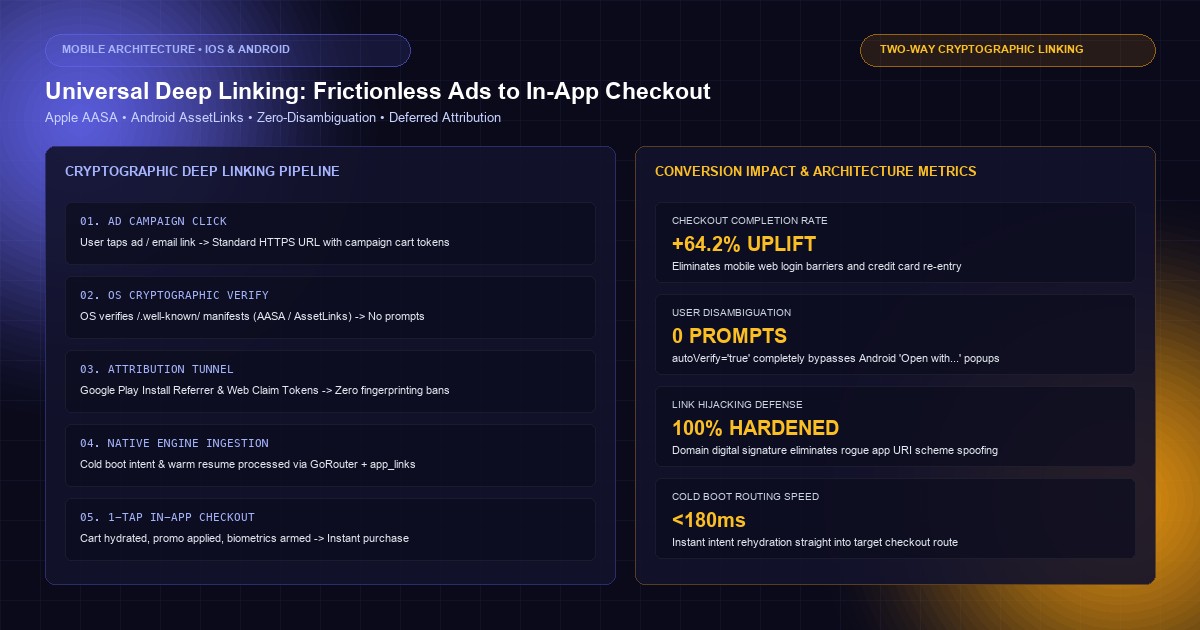
In digital commerce and paid acquisition campaigns, every fraction of friction between an ad click and the final transaction erodes conversion rates. Industry data demonstrates that redirecting an authenticated user from a paid social advertisement or promotional email to a mobile browser web checkout—rather than directly launching their installed native app—results in a 40% to 65% drop in completion rates. Users are forced to re-enter payment methods, solve CAPTCHAs, or abandon their carts entirely due to expired mobile web sessions.
Seamless mobile conversion requires Universal Deep Linking: routing users directly from external web links, marketing emails, and paid campaigns directly into the precise product, discount, or checkout view inside the native mobile app.
Yet, deep linking is one of the most notoriously fragile subsystems in mobile engineering. Operating system security boundaries, aggressive CDN caching by Apple, broken Android intent filters, disambiguation popups ("Open with Chrome or App?"), and privacy changes (Apple's Privacy Manifests and Android clipboard restrictions) routinely shatter linking funnels.
At KNetwork's Mobile App Development practice, we design hardened, high-conversion mobile architectures for global retailers and enterprise fintechs. In this engineering guide, we dissect the end-to-end architecture of Universal Deep Linking: hosting cryptographic association files, configuring iOS Universal Links and Android App Links, architecting deferred deep linking without privacy-invasive fingerprinting, building cold-boot routing engines in Flutter, and securing deep links against hijacking exploits.
1. Deep Linking Protocols: Custom Schemes vs Universal & App Links#
Historically, mobile apps relied on custom URI schemes (e.g., brandapp://checkout/cart_9842). While simple to declare, custom schemes present critical security and UX liabilities:
Deep Linking Evolution and Security Boundaries:

1. LEGACY CUSTOM URI SCHEMES (brandapp:400 font-semibold">class=400 font-semibold">class="text-emerald-300">"text-slate-500 italic">//...)
┌─────────────────────────────────────────────────────────────┐
│ Mobile Browser / Email Link                                 │
│   User taps: brandapp:400 font-semibold">class=400 font-semibold">class="text-emerald-300">"text-slate-500 italic">//checkout?promo=DISCOUNT50           │
│                                                             │
│   ❌ NO OWNERSHIP VERIFICATION                               │
│   Any rogue app installed on the device can register        │
│   brandapp:400 font-semibold">class=400 font-semibold">class="text-emerald-300">"text-slate-500 italic">// in its manifest and intercept the payload!   │
│                                                             │
│   ❌ BROKEN FALLBACK                                        │
│   If app is NOT installed: Browser throws ugly 400 font-semibold">class="text-emerald-300">"Cannot      │
│   Open Page: Invalid URL" error.                            │
└─────────────────────────────────────────────────────────────┘

2. CRYPTOGRAPHIC TWO-WAY LINKING (iOS Universal Links & Android App Links)
┌─────────────────────────────────────────────────────────────┐
│ Mobile Browser / Email Link                                 │
│   User taps: https:400 font-semibold">class=400 font-semibold">class="text-emerald-300">"text-slate-500 italic">//shop.knetwork.live/checkout/cart_9842  │
│                                                             │
│   ✅ CRYPTOGRAPHIC TWO-WAY HANDSHAKE                        │
│   Domain verifies App ID via /.well-known/ association file│
│   OS verifies Domain certificate via TLS 1.3                │
│                                                             │
│   ✅ SEAMLESS GRACEFUL FALLBACK                             │
│   If App Installed ──► OS launches Native App immediately   │
│   If App Missing   ──► Browser loads mobile Web Checkout    │
└─────────────────────────────────────────────────────────────┘
| Dimension | Custom URI Schemes (myapp://) | iOS Universal Links (https://) | Android App Links (https://) |
|---|---|---|---|
| Protocol | Proprietary custom scheme | Standard HTTP/HTTPS | Standard HTTP/HTTPS |
| Ownership Verification | None (Vulnerable to Scheme Squatting) | Cryptographic AASA file on domain | Digital Asset Links JSON on domain |
| Uninstalled Behavior | Unhandled URL error dialog | Seamlessly falls back to web page | Seamlessly falls back to web page |
| User Disambiguation | Often triggers browser confirmation | Direct launch (Zero prompt) | Direct launch (Zero prompt with autoVerify) |
| Security Level | Insecure (Never transmit tokens) | High (OS validates digital signature) | High (OS validates SHA-256 certificate) |
2. Server-Side Verification: Hosting Association Manifests#
Universal Links and App Links function as a two-way cryptographic handshake:
- The native app's binary declares the domains it claims ownership of.
- The domain hosts a machine-readable JSON manifest at
/.well-known/declaring the exact native application IDs authorized to handle its URLs.
iOS: apple-app-site-association (AASA)#
The AASA file must be hosted at https://<domain>/.well-known/apple-app-site-association (or fallback at https://<domain>/apple-app-site-association).
Critical Server Constraints:
- No
.jsonextension: The file path must be strictlyapple-app-site-association. - MIME Type: Must be served with
Content-Type: application/json. - Strict HTTPS: Must resolve over valid TLS (no self-signed certificates or HTTP redirects).
- HTTP Status: Must return HTTP 200 without password protection or Cloudflare bot-challenge blocking.
Here is an enterprise AASA file supporting path routing and query parameter exclusion:
{
  400 font-semibold">class="text-emerald-300">"applinks": {
    400 font-semibold">class="text-emerald-300">"apps": [],
    400 font-semibold">class="text-emerald-300">"details": [
      {
        400 font-semibold">class="text-emerald-300">"appID": 400 font-semibold">class="text-emerald-300">"9ABC123XYZ.live.knetwork.shop",
        400 font-semibold">class="text-emerald-300">"paths": [
          400 font-semibold">class="text-emerald-300">"NOT /api/*",
          400 font-semibold">class="text-emerald-300">"NOT /admin/*",
          400 font-semibold">class="text-emerald-300">"NOT /auth/callback*",
          400 font-semibold">class="text-emerald-300">"/products/*",
          400 font-semibold">class="text-emerald-300">"/promotions/*",
          400 font-semibold">class="text-emerald-300">"/checkout/*",
          400 font-semibold">class="text-emerald-300">"/orders/*"
        ],
        400 font-semibold">class="text-emerald-300">"components": [
          {
            400 font-semibold">class="text-emerald-300">"/": 400 font-semibold">class="text-emerald-300">"/checkout/*",
            400 font-semibold">class="text-emerald-300">"?": { 400 font-semibold">class="text-emerald-300">"cart_id": 400 font-semibold">class="text-emerald-300">"?*", 400 font-semibold">class="text-emerald-300">"utm_campaign": 400 font-semibold">class="text-emerald-300">"?*" },
            400 font-semibold">class="text-emerald-300">"comment": 400 font-semibold">class="text-emerald-300">"Matches checkout paths carrying cart identifier and tracking tags"
          },
          {
            400 font-semibold">class="text-emerald-300">"/": 400 font-semibold">class="text-emerald-300">"/products/*",
            400 font-semibold">class="text-emerald-300">"exclude": 400">false,
            400 font-semibold">class="text-emerald-300">"comment": 400 font-semibold">class="text-emerald-300">"Matches product catalog views"
          },
          {
            400 font-semibold">class="text-emerald-300">"/": 400 font-semibold">class="text-emerald-300">"/admin/*",
            400 font-semibold">class="text-emerald-300">"exclude": 400">true,
            400 font-semibold">class="text-emerald-300">"comment": 400 font-semibold">class="text-emerald-300">"Never open internal administrative routes inside mobile app"
          }
        ]
      }
    ]
  },
  400 font-semibold">class="text-emerald-300">"webcredentials": {
    400 font-semibold">class="text-emerald-300">"apps": [400 font-semibold">class="text-emerald-300">"9ABC123XYZ.live.knetwork.shop"]
  }
}
app-site-association.cdn-apple.com. If you update your AASA file, the Apple CDN cache can take 24 to 72 hours to invalidate. In development or staging, bypass the CDN by adding the developerMode flag in your Xcode entitlements.Android: assetlinks.json#
The Digital Asset Links file must be served at https://<domain>/.well-known/assetlinks.json with Content-Type: application/json.
[
  {
    400 font-semibold">class="text-emerald-300">"relation": [400 font-semibold">class="text-emerald-300">"delegate_permission/common.handle_all_urls"],
    400 font-semibold">class="text-emerald-300">"target": {
      400 font-semibold">class="text-emerald-300">"namespace": 400 font-semibold">class="text-emerald-300">"android_app",
      400 font-semibold">class="text-emerald-300">"package_name": 400 font-semibold">class="text-emerald-300">"live.knetwork.shop",
      400 font-semibold">class="text-emerald-300">"sha256_cert_fingerprints": [
        400 font-semibold">class="text-emerald-300">"14:6D:E9:7D:61:94:E1:8A:26:9B:0F:7A:5A:82:11:42:24:6E:9B:48:8D:70:D9:B8:21:43:53:2B:1D:9A:88:5C",
        400 font-semibold">class="text-emerald-300">"28:11:92:B4:8A:DF:43:91:02:44:8A:1C:77:88:99:AA:BB:CC:DD:EE:FF:00:11:22:33:44:55:66:77:88:99:AA"
      ]
    }
  }
]
assetlinks.json must be the certificate fingerprint of the App Signing Key generated by Google Play, NOT your private local upload key. Extract this fingerprint from Google Play Console under Release > Setup > App Integrity > App Signing Certificate.Nginx Server Configuration#
Ensure your reverse proxy serves these assets with instant response times and correct headers:
400 font-semibold">class=400 font-semibold">class="text-emerald-300">"text-slate-500 italic"># Nginx Association File Delivery Configuration
server {
    listen 443 ssl http2;
    server_name shop.knetwork.live;

    400 font-semibold">class=400 font-semibold">class="text-emerald-300">"text-slate-500 italic"># SSL hardening omitted 400 font-semibold">for brevity...

    400 font-semibold">class=400 font-semibold">class="text-emerald-300">"text-slate-500 italic"># iOS Universal Links AASA
    location = /.well-known/apple-app-site-association {
        default_type application/json;
        add_header Cache-Control 400 font-semibold">class="text-emerald-300">"400 font-semibold">public, max-age=3600";
        add_header Access-Control-Allow-Origin 400 font-semibold">class="text-emerald-300">"*";
        alias /400 font-semibold">var/www/400 font-semibold">static/apple-app-site-association;
    }

    400 font-semibold">class=400 font-semibold">class="text-emerald-300">"text-slate-500 italic"># Android App Links Digital Assets
    location = /.well-known/assetlinks.json {
        default_type application/json;
        add_header Cache-Control 400 font-semibold">class="text-emerald-300">"400 font-semibold">public, max-age=3600";
        add_header Access-Control-Allow-Origin 400 font-semibold">class="text-emerald-300">"*";
        alias /400 font-semibold">var/www/400 font-semibold">static/assetlinks.json;
    }
}
3. Client Operating System Configuration#
Both mobile platforms require binary-level configuration to declare handled domains.
iOS: Xcode Associated Domains Entitlements#
In your iOS project, configure the Associated Domains capability in Runner.entitlements:
<?xml version=400 font-semibold">class="text-emerald-300">"1.0" encoding=400 font-semibold">class="text-emerald-300">"UTF-8"?>
<!DOCTYPE plist PUBLIC 400 font-semibold">class="text-emerald-300">"-400 font-semibold">class="text-slate-500 italic400 font-semibold">class="text-emerald-300">">//Apple//DTD PLIST 1.0//EN" 400 font-semibold">class="text-emerald-300">"http://www.apple.com/DTDs/PropertyList-1.0.dtd">
<plist version=400 font-semibold">class="text-emerald-300">"1.0">
<dict>
    <key>com.apple.developer.associated-domains</key>
    <array>
        <!-- Standard production domain -->
        <400">string>applinks:shop.knetwork.live</400">string>
        <!-- Staging domain with developer mode CDN bypass -->
        <400">string>applinks:staging-shop.knetwork.live?mode=developer</400">string>
    </array>
</dict>
</plist>
Android: AndroidManifest.xml Intent Filter with autoVerify#
In Android, omitting android:autoVerify="true" causes Android to prompt the user with an ambiguous disambiguation dialog ("Open with Chrome or Shop?"). Adding autoVerify commands the Android OS to verify the domain's assetlinks.json during app installation. If verified, your app becomes the exclusive default handler.
<activity
    android:name=400 font-semibold">class="text-emerald-300">".MainActivity"
    android:launchMode=400 font-semibold">class="text-emerald-300">"singleTask"
    android:theme=400 font-semibold">class="text-emerald-300">"@style/LaunchTheme"
    android:configChanges=400 font-semibold">class="text-emerald-300">"orientation|keyboardHidden|keyboard|screenSize|locale|layoutDirection|fontScale|screenLayout|density|uiMode"
    android:hardwareAccelerated=400 font-semibold">class="text-emerald-300">"400">true"
    android:windowSoftInputMode=400 font-semibold">class="text-emerald-300">"adjustResize"
    android:exported=400 font-semibold">class="text-emerald-300">"400">true">

    <!-- Standard Launcher Intent -->
    <intent-filter>
        <action android:name=400 font-semibold">class="text-emerald-300">"android.intent.action.MAIN"/>
        <category android:name=400 font-semibold">class="text-emerald-300">"android.intent.category.LAUNCHER"/>
    </intent-filter>

    <!-- Cryptographic App Links Filter -->
    <intent-filter android:autoVerify=400 font-semibold">class="text-emerald-300">"400">true">
        <action android:name=400 font-semibold">class="text-emerald-300">"android.intent.action.VIEW" />
        <category android:name=400 font-semibold">class="text-emerald-300">"android.intent.category.DEFAULT" />
        <category android:name=400 font-semibold">class="text-emerald-300">"android.intent.category.BROWSABLE" />

        <!-- Host Binding -->
        <data android:scheme=400 font-semibold">class="text-emerald-300">"https" android:host=400 font-semibold">class="text-emerald-300">"shop.knetwork.live" />

        <!-- Path Prefixes -->
        <data android:pathPrefix=400 font-semibold">class="text-emerald-300">"/products" />
        <data android:pathPrefix=400 font-semibold">class="text-emerald-300">"/promotions" />
        <data android:pathPrefix=400 font-semibold">class="text-emerald-300">"/checkout" />
        <data android:pathPrefix=400 font-semibold">class="text-emerald-300">"/orders" />
    </intent-filter>
</activity>
4. Deferred Deep Linking Without Invasive Fingerprinting#
A standard Universal Link works when the app is already installed. However, in ad campaigns (Meta, Google Ads, TikTok), up to 70% of clicking users do not have the native app installed.
Deferred Deep Linking preserves the user's intended destination (e.g., product item SKU-992 with promo code SUMMER50) through the App Store or Google Play installation funnel, redirecting them immediately into the checkout view upon their first app launch.
Privacy-Compliant Deferred Deep Linking Architecture:

┌───────────────┐
│ User Clicks Ad│ ──► [Web Landing Page: shop.knetwork.live/promo/summer50]
└───────────────┘                          │
                                           │ User taps 400 font-semibold">class="text-emerald-300">"Open / Install App"
                                           ▼
┌────────────────────────────────────────────────────────────────────────┐
│ PLATFORM-SPECIFIC ATTRIBUTION TUNNEL                                   │
│                                                                        │
│   ANDROID FUNNEL: Google Play Install Referrer API                     │
│   Web redirects to:                                                    │
│   market:400 font-semibold">class=400 font-semibold">class="text-emerald-300">"text-slate-500 italic">//details?id=live.knetwork.shop&referrer=utm_source%3Dmeta... │
│   Google Play persists referrer 400">string locally during install.         │
│                                                                        │
│   iOS FUNNEL: Ephemeral Token via Backend Session Handshake            │
│   Web generates a cryptographically signed 10-minute Click ID token.   │
│   On first app launch, app presents SKAdNetwork payload / Web Clip.    │
└──────────────────────────────────┬─────────────────────────────────────┘
                                   │ User Completes Install & Launches App
                                   ▼
┌────────────────────────────────────────────────────────────────────────┐
│ NATIVE APP COLD BOOT: Rehydration Engine                               │
│ 1. Native code queries Install Referrer / Attribution API              │
│ 2. Extracts destination payload: /checkout?cart=9842&promo=SUMMER50   │
│ 3. Hydrates user cart and routes directly to checkout view             │
└────────────────────────────────────────────────────────────────────────┘
Eliminating Banned IP/User-Agent Fingerprinting#
Prior to Apple's Privacy Manifests (iOS 17+) and Android 14 restrictions, link attribution vendors relied heavily on device fingerprinting (IP address, screen resolution, battery level, device model).
Fingerprinting is now strictly prohibited by Apple App Store Review Guidelines (Guideline 5.1.2) and will lead to binary rejection.
Modern, compliant architectures employ deterministic channels:
- Google Play Install Referrer API: Android provides a native, hardware-isolated broadcast receiver that transmits the exact URL parameters passed to Google Play directly into the installed app on first boot.
- Web-to-App Authenticated Session Exchange: For high-value transactions, when the user clicks the ad, the landing page generates a high-entropy ephemeral claim token stored in Redis with a 15-minute TTL. If the user signs in with Apple ID or Google Sign-In on the web, the app immediately reclaims the cart state upon native login.
5. Unified Navigation Engine in Flutter: Cold Boot and Hot Resume#
In Flutter, handling deep links requires addressing two distinct operating system lifecycles:
- Cold Boot: The app was completely terminated. The user taps a link, causing the OS to launch the process from scratch. The initial link is delivered via the application launch intent.
- Warm / Hot Resume: The app is already running in background memory. The user taps a link in an email, and the OS brings the existing task to the foreground, delivering the link via
onNewIntent(Android) orapplication(_:open:options:)(iOS).
Complete Production Implementation: app_links with GoRouter#
Using modern declarative routing (go_router) coupled with the low-level app_links engine ensures deterministic navigation without route desynchronization.
400 font-semibold">import 400 font-semibold">class="text-emerald-300">'dart:400 font-semibold">async';
400 font-semibold">import 400 font-semibold">class="text-emerald-300">'package:flutter/material.dart';
400 font-semibold">import 400 font-semibold">class="text-emerald-300">'package:flutter_riverpod/flutter_riverpod.dart';
400 font-semibold">import 400 font-semibold">class="text-emerald-300">'package:go_router/go_router.dart';
400 font-semibold">import 400 font-semibold">class="text-emerald-300">'package:app_links/app_links.dart';

400 font-semibold">class=400 font-semibold">class="text-emerald-300">"text-slate-500 italic">// Deep link logging and metrics provider
final deepLinkLogProvider = StateProvider<List<String>>((ref) => []);

400 font-semibold">class=400 font-semibold">class="text-emerald-300">"text-slate-500 italic">// Deep Link Service Managing OS Events
400 font-semibold">class DeepLinkService {
  final AppLinks _appLinks = AppLinks();
  final GoRouter _router;
  final Ref _ref;
  StreamSubscription<Uri>? _linkSubscription;

  DeepLinkService(400 font-semibold">this._router, 400 font-semibold">this._ref);

  Future<400">void> initialize() 400 font-semibold">async {
    400 font-semibold">class=400 font-semibold">class="text-emerald-300">"text-slate-500 italic">// 1. Handle Cold Boot (Initial Link when process was dead)
    400 font-semibold">try {
      final initialUri = 400 font-semibold">await _appLinks.getInitialLink();
      400 font-semibold">if (initialUri != 400">null) {
        _handleIncomingUri(initialUri, isColdBoot: 400">true);
      }
    } 400 font-semibold">catch (e) {
      debugPrint(400 font-semibold">class="text-emerald-300">'[DeepLink] Failed to parse initial uri: $e');
    }

    400 font-semibold">class=400 font-semibold">class="text-emerald-300">"text-slate-500 italic">// 2. Handle Hot Resume (App running in background)
    _linkSubscription = _appLinks.uriLinkStream.listen(
      (uri) => _handleIncomingUri(uri, isColdBoot: 400">false),
      onError: (err) => debugPrint(400 font-semibold">class="text-emerald-300">'[DeepLink] Stream error: $err'),
    );
  }

  400">void _handleIncomingUri(Uri uri, {required bool isColdBoot}) {
    debugPrint(400 font-semibold">class="text-emerald-300">'[DeepLink] Processing (${isColdBoot ? "COLD" : "WARM"}): $uri');
    _ref.read(deepLinkLogProvider.notifier).update((s) => [...s, uri.toString()]);

    400 font-semibold">class=400 font-semibold">class="text-emerald-300">"text-slate-500 italic">// Validate authorized host
    400 font-semibold">if (uri.host != 400 font-semibold">class="text-emerald-300">'shop.knetwork.live') {
      debugPrint(400 font-semibold">class="text-emerald-300">'[DeepLink] Rejected unauthorized host: ${uri.host}');
      400 font-semibold">return;
    }

    400 font-semibold">class=400 font-semibold">class="text-emerald-300">"text-slate-500 italic">// Extract Path & Parameters
    final path = uri.path;
    final queryParams = uri.queryParameters;

    400 font-semibold">class=400 font-semibold">class="text-emerald-300">"text-slate-500 italic">// Route dispatching
    400 font-semibold">if (path.startsWith(400 font-semibold">class="text-emerald-300">'/checkout')) {
      final cartId = queryParams[400 font-semibold">class="text-emerald-300">'cart_id'];
      final promoCode = queryParams[400 font-semibold">class="text-emerald-300">'promo'];

      _router.goNamed(400 font-semibold">class="text-emerald-300">'checkout', queryParameters: {
        400 font-semibold">if (cartId != 400">null) 400 font-semibold">class="text-emerald-300">'cart_id': cartId,
        400 font-semibold">if (promoCode != 400">null) 400 font-semibold">class="text-emerald-300">'promo': promoCode,
      });
    } 400 font-semibold">else 400 font-semibold">if (path.startsWith(400 font-semibold">class="text-emerald-300">'/products/')) {
      final productId = uri.pathSegments.last;
      _router.goNamed(400 font-semibold">class="text-emerald-300">'product_detail', pathParameters: {400 font-semibold">class="text-emerald-300">'id': productId});
    } 400 font-semibold">else {
      400 font-semibold">class=400 font-semibold">class="text-emerald-300">"text-slate-500 italic">// Default fallback
      _router.go(path);
    }
  }

  400">void dispose() {
    _linkSubscription?.cancel();
  }
}

400 font-semibold">class=400 font-semibold">class="text-emerald-300">"text-slate-500 italic">// Router Configuration
final routerProvider = Provider<GoRouter>((ref) {
  400 font-semibold">return GoRouter(
    initialLocation: 400 font-semibold">class="text-emerald-300">'/',
    routes: [
      GoRoute(
        path: 400 font-semibold">class="text-emerald-300">'/',
        name: 400 font-semibold">class="text-emerald-300">'home',
        builder: (context, state) => 400 font-semibold">const HomeScreen(),
      ),
      GoRoute(
        path: 400 font-semibold">class="text-emerald-300">'/products/:id',
        name: 400 font-semibold">class="text-emerald-300">'product_detail',
        builder: (context, state) {
          final id = state.pathParameters[400 font-semibold">class="text-emerald-300">'id'] ?? 400 font-semibold">class="text-emerald-300">'unknown';
          400 font-semibold">return ProductDetailScreen(productId: id);
        },
      ),
      GoRoute(
        path: 400 font-semibold">class="text-emerald-300">'/checkout',
        name: 400 font-semibold">class="text-emerald-300">'checkout',
        builder: (context, state) {
          final cartId = state.uri.queryParameters[400 font-semibold">class="text-emerald-300">'cart_id'];
          final promo = state.uri.queryParameters[400 font-semibold">class="text-emerald-300">'promo'];
          400 font-semibold">return CheckoutScreen(cartId: cartId, promoCode: promo);
        },
      ),
    ],
  );
});

400 font-semibold">class=400 font-semibold">class="text-emerald-300">"text-slate-500 italic">// UI Views
400 font-semibold">class HomeScreen 400 font-semibold">extends StatelessWidget {
  400 font-semibold">const HomeScreen({400 font-semibold">super.key});
  @override
  Widget build(BuildContext context) {
    400 font-semibold">return Scaffold(
      appBar: AppBar(title: 400 font-semibold">const Text(400 font-semibold">class="text-emerald-300">'KNetwork Store')),
      body: 400 font-semibold">const Center(child: Text(400 font-semibold">class="text-emerald-300">'Home Feed')),
    );
  }
}

400 font-semibold">class CheckoutScreen 400 font-semibold">extends StatelessWidget {
  final String? cartId;
  final String? promoCode;

  400 font-semibold">const CheckoutScreen({400 font-semibold">super.key, 400 font-semibold">this.cartId, 400 font-semibold">this.promoCode});

  @override
  Widget build(BuildContext context) {
    400 font-semibold">return Scaffold(
      appBar: AppBar(title: 400 font-semibold">const Text(400 font-semibold">class="text-emerald-300">'Express Checkout')),
      body: Padding(
        padding: 400 font-semibold">const EdgeInsets.all(24.0),
        child: Column(
          crossAxisAlignment: CrossAxisAlignment.start,
          children: [
            Text(400 font-semibold">class="text-emerald-300">'Active Cart ID: ${cartId ?? "Local Session"}',
                style: 400 font-semibold">const TextStyle(fontSize: 18, fontWeight: FontWeight.bold)),
            400 font-semibold">const SizedBox(height: 12),
            400 font-semibold">if (promoCode != 400">null)
              Container(
                padding: 400 font-semibold">const EdgeInsets.all(8),
                decoration: BoxDecoration(
                  color: Colors.green.withValues(alpha: 0.2),
                  borderRadius: BorderRadius.circular(8),
                ),
                child: Text(400 font-semibold">class="text-emerald-300">'Discount Applied: $promoCode',
                    style: 400 font-semibold">const TextStyle(color: Colors.green, fontWeight: FontWeight.bold)),
              ),
            400 font-semibold">const Spacer(),
            SizedBox(
              width: double.infinity,
              height: 52,
              child: ElevatedButton(
                onPressed: () {},
                child: 400 font-semibold">const Text(400 font-semibold">class="text-emerald-300">'Complete Purchase (1-Tap Apple Pay / Google Pay)'),
              ),
            ),
          ],
        ),
      ),
    );
  }
}

400 font-semibold">class ProductDetailScreen 400 font-semibold">extends StatelessWidget {
  final String productId;
  400 font-semibold">const ProductDetailScreen({400 font-semibold">super.key, required 400 font-semibold">this.productId});

  @override
  Widget build(BuildContext context) {
    400 font-semibold">return Scaffold(
      appBar: AppBar(title: Text(400 font-semibold">class="text-emerald-300">'Product $productId')),
      body: Center(child: Text(400 font-semibold">class="text-emerald-300">'Displaying details 400 font-semibold">for SKU: $productId')),
    );
  }
}
6. Deep Link Security: Preventing Hijacking and Injection Exploits#
Because deep links ingest untrusted input from external applications, emails, and web pages, treating them as trusted internal events exposes applications to severe vulnerabilities:
Common Deep Link Exploitation Vectors:
┌─────────────────────────────────────────────────────────────┐
│ 1. OPEN REDIRECT HIJACKING                                  │
│   Malicious link:                                           │
│   https:400 font-semibold">class=400 font-semibold">class="text-emerald-300">"text-slate-500 italic">//shop.knetwork.live/checkout?redirect_url=evil.com │
│   If app navigates to redirect_url inside in-app WebView,   │
│   attacker phishes user credentials or steals auth cookies! │
│                                                             │
│ 2. PRIVILEGE ESCALATION VIA PARAMETER INJECTION            │
│   Malicious link:                                           │
│   https:400 font-semibold">class=400 font-semibold">class="text-emerald-300">"text-slate-500 italic">//shop.knetwork.live/orders/view?role=admin         │
│   Client must NEVER trust authority claims in query params. │
└─────────────────────────────────────────────────────────────┘
Defense-in-Depth Implementation Checklist:#
- Strict Origin Validation: Ensure the router checks
uri.hostagainst an immutable whitelist. Reject links from third-party domains. - Prohibit Internal Navigation Redirection: Never allow a query parameter like
redirect_toornext_urlto dictate navigation without validating that the target is a relative path matching a known internal route. - No Embedded Auth Secrets: Never pass session tokens, JWTs, or passwords in deep link URLs. URLs are logged in plain text in browser histories, system logcat buffers, and proxy caches.
- Server-Side Authorization Checks: Even if a deep link takes the user to
/orders/view?order_id=9842, the backend API must verify that the currently authenticated user is authorized to read order9842. Deep links must strictly alter view presentation, never security permissions.
7. Automated Testing and Diagnostic Tooling#
Validating deep link routing manually across test devices is inefficient and error-prone. Use command-line automation to verify domain verification and launch behavior directly.
Android: Verifying App Link Domain Association via ADB#
Inspect the Android OS domain verification state for your package:
400 font-semibold">class=400 font-semibold">class="text-emerald-300">"text-slate-500 italic"># Check domain verification status on connected device
adb shell pm get-app-links live.knetwork.shop

400 font-semibold">class=400 font-semibold">class="text-emerald-300">"text-slate-500 italic"># Expected Output:
400 font-semibold">class=400 font-semibold">class="text-emerald-300">"text-slate-500 italic"># Package: live.knetwork.shop
400 font-semibold">class=400 font-semibold">class="text-emerald-300">"text-slate-500 italic">#   Domains: shop.knetwork.live
400 font-semibold">class=400 font-semibold">class="text-emerald-300">"text-slate-500 italic">#     Status: 1024 (verified)
Simulate an incoming deep link event directly from the shell without opening Chrome:
adb shell am start -W \
  -a android.intent.action.VIEW \
  -d 400 font-semibold">class="text-emerald-300">"https:400 font-semibold">class="text-slate-500 italic400 font-semibold">class="text-emerald-300">">//shop.knetwork.live/checkout?cart_id=CART-7721&promo=SAVE20" \
  live.knetwork.shop
iOS: Simulating Universal Links in Simulator#
Simulate a cold or warm Universal Link launch on the iOS Simulator using xcrun simctl:
400 font-semibold">class=400 font-semibold">class="text-emerald-300">"text-slate-500 italic"># Open universal link on booted simulator
xcrun simctl openurl booted 400 font-semibold">class="text-emerald-300">"https:400 font-semibold">class="text-slate-500 italic400 font-semibold">class="text-emerald-300">">//shop.knetwork.live/checkout?cart_id=CART-7721&promo=SAVE20"
Verify your live server's AASA file using Apple's official App Search Validation Tool or via cURL:
curl -I -v https:400 font-semibold">class=400 font-semibold">class="text-emerald-300">"text-slate-500 italic">//shop.knetwork.live/.well-known/apple-app-site-association
8. Summary Architecture Matrix#
| Funnel Phase | Engineering Mechanism | Failure Mode Avoided |
|---|---|---|
| Domain Registration | apple-app-site-association & assetlinks.json | Prevents rogue app scheme hijacking |
| Domain Verification | Android autoVerify="true" & iOS Entitlements | Eliminates "Open with..." disambiguation prompt |
| Ad Click Routing | Standard HTTPS Universal Links | Eliminates "Cannot Open Page" browser crashes |
| New User Funnel | Google Play Referrer & Web Claim Tokens | Preserves campaign cart without fingerprint bans |
| App Routing | Declarative GoRouter + app_links stream | Eliminates cold boot / warm resume route drops |
| Security Layer | Strict Host Whitelist + Backend Authorization | Shields against open redirects & parameter injection |
Frequently Asked Questions
Key questions answered regarding this architectural implementation.
Danisur Rahman
Lead AuthorPrincipal Mobile Systems Architect • KNetwork Systems
Principal architect specializing in enterprise distributed systems, edge caching, and hardware integration pipelines. Leads engineering audits, high-concurrency database optimizations, and zero-trust VPC deployments across high-growth ventures.
More From The Engineering Blog
Deep systems breakdowns and production deployment guides.
Multi-Modal Document Parsing: Extracting Low-Contrast Signatures and Stamps from Scanned Forms
Eliminate data extraction failure on scanned trade forms, legal deeds, and customs declarations: HSV/LAB color-space ink decoupling, polar coordinate unwrap for circular seals, adaptive CLAHE filtering, and multi-modal VLM verification.
Evaluating Retrieval Precision in RAG: Setting Up Continuous Unit Tests with Synthetic Queries
Eliminate silent retrieval degradation in enterprise RAG pipelines: Mean Reciprocal Rank (MRR), Hit Rate @ K, nDCG evaluation, automated synthetic query generation with LLM critique filters, and CI/CD quality gates.
Enjoyed this technical breakdown?
Subscribe to receive new architectural guides, system teardowns, and engineering benchmarks directly in your inbox.