Secure Hardware Enclaves in Mobile: Storing Private Keys Using Biometric-Backed Keystores
Eliminate key extraction vulnerabilities in enterprise mobile apps: Apple Secure Enclave Processor (SEP) vs Android StrongBox Keymaster EAL5+, hardware-enforced biometric gating, X.509 key attestation, and native Swift/Kotlin cryptographic signing channels.
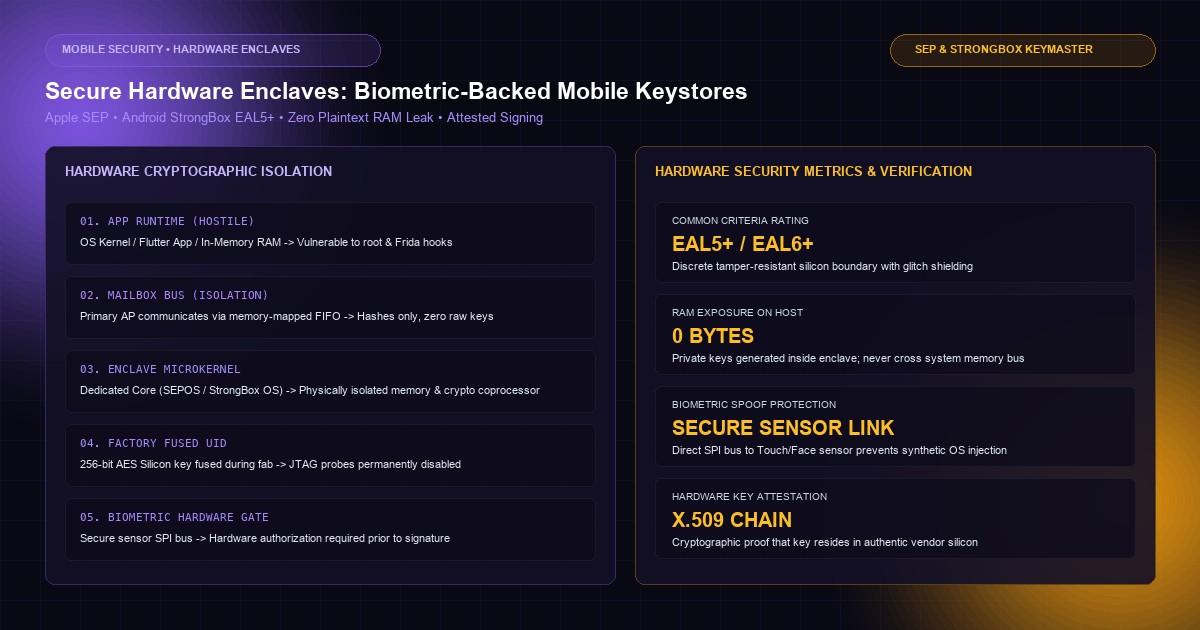
In an era of ubiquitous mobile enterprise access, high-value financial transfers, healthcare record updates, and industrial infrastructure controls are routinely executed from mobile devices. However, standard operating system memory is fundamentally hostile territory: rooted Android handsets, jailbroken iPhones, malicious accessibility services, and dynamic runtime manipulation frameworks (such as Frida and Ghidra) allow sophisticated attackers to inspect application RAM, hook function pointers, and extract sensitive session tokens.
Storing persistent private cryptographic keys, API access secrets, or OAuth refresh tokens in standard mobile file storage or software-encrypted SQLite databases is a severe architectural vulnerability. If an attacker gains device root access or extracts an unencrypted physical flash dump, software-managed encryption keys stored in memory can be scavenged within minutes.
True zero-trust mobile security requires shifting the cryptographic root of trust to Dedicated Secure Hardware Enclaves. By delegating key generation, storage, and cryptographic signing to physically isolated microprocessors—such as Apple's Secure Enclave Processor (SEP) and Android's StrongBox Keymaster—private keys become physically unextractable. When these enclave-resident keys are gated behind hardware-enforced biometric authorization policies, signing operations require physical user presence that cannot be spoofed by OS-level malware.
At KNetwork's Mobile App Development practice, we design hardened, high-assurance mobile platforms for financial institutions and enterprise operations. In this deep-dive guide, we examine the silicon architecture of mobile hardware security modules, contrast TEE against StrongBox hardware, formulate hardware-attested key generation, implement biometric-gated asymmetric signing in Flutter via native bridge channels, and audit the mobile hardware attack surface.
1. Silicon Architecture: Inside Apple SEP and Android StrongBox#
Mobile device processors are partitioned into distinct operational security domains. Understanding how keys are shielded requires analyzing the silicon boundary separating the primary Application Processor (AP) from hardware cryptographic modules.
Hardware Enclave Physical Isolation Architecture:
┌────────────────────────────────────────────────────────────────────────┐
│ PRIMARY APPLICATION PROCESSOR (AP)                                     │
│ (Executes iOS / Android Kernel, Flutter Engine, User Apps)             │
│                                                                        │
│   [Flutter UI] ──► [Native Host Bridge] ──► [OS Keystore Driver]       │
│                                                     │                  │
└─────────────────────────────────────────────────────┼──────────────────┘
                                                      │ Hardware Mailbox
                          SILICON ISOLATION BOUNDARY  │ (Shared Ring Buffer)
                                                      ▼
┌────────────────────────────────────────────────────────────────────────┐
│ DEDICATED HARDWARE SECURITY SUBSYSTEM                                  │
│ (Apple Secure Enclave Processor / Android StrongBox Keymaster)         │
│                                                                        │
│   ┌────────────────────┐    ┌────────────────────┐    ┌─────────────┐  │
│   │ Isolated Core      │    │ Cryptographic AES/ │    │ Hardware    │  │
│   │ (Microkernel OS)   │    │ P-256 Engine       │    │ True RNG    │  │
│   └─────────┬──────────┘    └─────────┬──────────┘    └──────┬──────┘  │
│             │                         │                      │         │
│             └─────────────────────────┼──────────────────────┘         │
│                                       ▼                                │
│   ┌────────────────────────────────────────────────────────────────┐   │
│   │ Dedicated Encrypted SRAM + Factory Fused Hardware UID Key       │   │
│   │ (Physically unreadable by primary AP, JTAG disabled)           │   │
│   └────────────────────────────────────────────────────────────────┘   │
└────────────────────────────────────────────────────────────────────────┘
Apple Secure Enclave Processor (SEP)#
The Apple Secure Enclave is an autonomous hardware coprocessor fabricated directly into Apple Silicon (A-Series and M-Series SoCs):
- Dedicated Core & OS: It executes its own microkernel operating system (SEPOS) based on an isolated L4 kernel, running entirely independently of the Darwin/iOS kernel.
- Factory Fused UID: During silicon fabrication, a 256-bit hardware Unique ID (UID) is permanently fused via electronic fuses into the chip. This UID is completely inaccessible to software, firmware, Apple engineers, or debugging probes (JTAG is permanently blown during manufacturing). All enclave storage is encrypted under keys derived from this hardware UID.
- Sideband Communication: The Application Processor communicates with the SEP exclusively through a memory-mapped Mailbox interface and a hardware interrupt controller. When iOS requests a cryptographic signature, it passes the data hash across the mailbox. The SEP validates authorization internally, signs the hash using its dedicated cryptographic engine, and returns only the final signature. The private key never crosses the physical bus into AP memory.
Android TEE vs StrongBox Keymaster#
The Android security ecosystem provides two distinct tiers of hardware protection:
| Specification Metric | Trusted Execution Environment (TEE) | StrongBox Keymaster (Common Criteria EAL5+) |
|---|---|---|
| Underlying Silicon | ARM TrustZone on primary AP core | Physically discrete tamper-resistant microcontroller |
| Hardware Core Isolation | Logical time-sliced processor core | Dedicated separate silicon chip (e.g. Titan M2, Knox Vault) |
| Cryptographic Clock | Shares main system oscillator | Independent, tamper-resistant on-chip clock source |
| Physical Attack Defense | Vulnerable to board-level bus probing | Resistant to laser fault injection and power analysis |
| Evaluation Level | Common Criteria EAL2+ to EAL4+ | Common Criteria EAL5+ / FIPS 140-3 Level 3 |
| Supported Devices | All modern Android 10+ devices | Google Pixel 3+, Samsung S20+ (Knox), High-tier OEM |
2. The Biometric Gate: Software vs Hardware-Enforced Authorization#
A catastrophic security anti-pattern frequently observed in cross-platform mobile engineering is Software-Level Biometric Gating.
The Vulnerable Pattern: Software Boolean Verification#
In naive implementations, developers use libraries (such as generic biometric wrapper plugins) to trigger a prompt:
400 font-semibold">class=400 font-semibold">class="text-emerald-300">"text-slate-500 italic">// CRITICAL VULNERABILITY: Software-Enforced Biometrics
final LocalAuthentication auth = LocalAuthentication();
final bool didAuthenticate = 400 font-semibold">await auth.authenticate(
  localizedReason: 400 font-semibold">class="text-emerald-300">'Authenticate to sign transaction',
);

400 font-semibold">if (didAuthenticate) {
  400 font-semibold">class=400 font-semibold">class="text-emerald-300">"text-slate-500 italic">// AT RISK: An attacker hooks 400 font-semibold">this block via Frida, forcing didAuthenticate = 400">true
  final privateKeyHex = 400 font-semibold">await secureStorage.read(key: 400 font-semibold">class="text-emerald-300">'user_private_key');
  final signature = signLocally(payload, privateKeyHex);
}
In the vulnerable snippet above, the biometric prompt is completely detached from the cryptographic key. An attacker executing a rooted device with Frida can hook the authenticate() method and force it to return true with a single line of JavaScript:
400 font-semibold">class=400 font-semibold">class="text-emerald-300">"text-slate-500 italic">// Frida script bypassing software biometric gates in 10ms:
Interceptor.attach(Module.findExportByName(400 font-semibold">class="text-emerald-300">"liblocal_auth.so", 400 font-semibold">class="text-emerald-300">"authenticate"), {
  onLeave: 400 font-semibold">function(retval) {
    retval.replace(1); 400 font-semibold">class=400 font-semibold">class="text-emerald-300">"text-slate-500 italic">// Force 400 font-semibold">return 400">true
  }
});
The Hardened Pattern: Hardware-Gated Access Control#
True biometric security requires that the hardware enclave itself refuses to release the private key or perform a signing operation unless the secure biometric sensor has successfully validated the user.
Hardware-Enforced Biometric Authentication Flow:
┌────────────────────────────────────────────────────────────────────────┐
│ 1. Application requests signing: 400 font-semibold">class="text-emerald-300">`sign(payloadHash, keyAlias)`          │
│ 2. Enclave evaluates Access Control List (ACL) assigned at key creation │
│ 3. Enclave locks key: Requires Biometric User Presence token            │
│ 4. Face ID / Touch ID / Fingerprint sensor scans physical biometric     │
│ 5. Sensor communicates MATCH directly to Enclave via isolated bus       │
│ 6. Enclave unlocks P-256 signing engine 400 font-semibold">for exactly ONE operation      │
│ 7. Enclave returns ECDSA signature; OS never touches 400 font-semibold">private key        │
└────────────────────────────────────────────────────────────────────────┘
On iOS, this is enforced by configuring Keychain items with SecAccessControlCreateWithFlags using the .biometryAny or .biometryCurrentSet flags combined with .privateKeyUsage. On Android, it is achieved via KeyGenParameterSpec.Builder.setUserAuthenticationRequired(true) with AUTH_BIOMETRIC_STRONG.
3. Asymmetric Cryptography: P-256 Signing and Zero Shared Secrets#
Traditional authentication relies on symmetric credentials: passwords, API keys, or JWT bearer tokens. When symmetric credentials are used, both the client and server must share knowledge of the secret, meaning a compromised backend database leaks all client credentials.
Hardware enclaves resolve this by enforcing Public-Key Asymmetric Cryptography (specifically NIST Curve P-256 / secp256r1):
- Enrollment: The mobile device generates a public/private keypair inside the hardware enclave.
- The private key remains permanently trapped inside silicon.
- The public key (65 bytes in uncompressed X9.62 format) is exported and registered with the enterprise backend.
- Authentication / Transaction Signing: When signing a transaction, the server issues a high-entropy cryptographic nonce (preventing replay attacks). The device passes the nonce to the enclave, prompts for biometric verification, generates an ECDSA signature, and returns the signature to the server.
- The backend verifies the signature against the registered public key using standard cryptography (RFC 9110 HTTP Message Signatures or WebAuthn/FIDO2 standards).
4. Production Flutter Implementation: Bridging Native Enclaves#
Flutter applications interact with platform hardware via Platform Channels (MethodChannel). Below is the complete production-grade implementation bridging Apple's Secure Enclave on iOS and StrongBox/TEE on Android.
Native iOS Implementation (Swift: SecureEnclaveManager.swift)#
400 font-semibold">class=400 font-semibold">class="text-emerald-300">"text-slate-500 italic">// ios/Runner/SecureEnclaveManager.swift
400 font-semibold">import Foundation
400 font-semibold">import Security
400 font-semibold">import LocalAuthentication

@objc 400 font-semibold">class SecureEnclaveManager: NSObject {

  400 font-semibold">static 400 font-semibold">let shared = SecureEnclaveManager()
  400 font-semibold">private 400 font-semibold">let tag = 400 font-semibold">class="text-emerald-300">"live.knetwork.keys.transaction-signing".data(using: .utf8)!

  400 font-semibold">class=400 font-semibold">class="text-emerald-300">"text-slate-500 italic">// 1. Generate P-256 Keypair inside Secure Enclave
  func generateEnclaveKeypair() throws -> Data {
    400 font-semibold">class=400 font-semibold">class="text-emerald-300">"text-slate-500 italic">// Delete 400">any existing key under 400 font-semibold">this tag
    400 font-semibold">let deleteQuery: [String: Any] = [
      kSecClass as String: kSecClassKey,
      kSecAttrApplicationTag as String: tag,
      kSecAttrKeyType as String: kSecAttrKeyTypeECSECPrimeRandom
    ]
    SecItemDelete(deleteQuery as CFDictionary)

    400 font-semibold">class=400 font-semibold">class="text-emerald-300">"text-slate-500 italic">// Enforce Hardware Enclave and Biometric ACL
    400 font-semibold">var error: Unmanaged<CFError>?
    guard 400 font-semibold">let accessControl = SecAccessControlCreateWithFlags(
      kCFAllocatorDefault,
      kSecAttrAccessibleAfterFirstUnlockThisDeviceOnly,
      [.privateKeyUsage, .biometryCurrentSet], 400 font-semibold">class=400 font-semibold">class="text-emerald-300">"text-slate-500 italic">// Invalidated 400 font-semibold">if 400 font-semibold">new fingerprint/face added
      &error
    ) 400 font-semibold">else {
      400 font-semibold">throw error!.takeRetainedValue() as Error
    }

    400 font-semibold">let attributes: [String: Any] = [
      kSecAttrKeyType as String: kSecAttrKeyTypeECSECPrimeRandom,
      kSecAttrKeySizeInBits as String: 256,
      kSecAttrTokenID as String: kSecAttrTokenIDSecureEnclave, 400 font-semibold">class=400 font-semibold">class="text-emerald-300">"text-slate-500 italic">// Force Secure Enclave
      kSecPrivateKeyAttrs as String: [
        kSecAttrIsPermanent as String: 400">true,
        kSecAttrApplicationTag as String: tag,
        kSecAttrAccessControl as String: accessControl
      ]
    ]

    guard 400 font-semibold">let privateKey = SecKeyCreateRandomKey(attributes as CFDictionary, &error) 400 font-semibold">else {
      400 font-semibold">throw error!.takeRetainedValue() as Error
    }

    guard 400 font-semibold">let publicKey = SecKeyCopyPublicKey(privateKey),
          400 font-semibold">let publicKeyData = SecKeyCopyExternalRepresentation(publicKey, &error) 400 font-semibold">else {
      400 font-semibold">throw error!.takeRetainedValue() as Error
    }

    400 font-semibold">return publicKeyData as Data
  }

  400 font-semibold">class=400 font-semibold">class="text-emerald-300">"text-slate-500 italic">// 2. Sign Data inside Enclave (Hardware Biometric Prompt Triggered Automatically)
  func signPayload(dataToSign: Data, promptMessage: String) throws -> Data {
    400 font-semibold">let context = LAContext()
    context.localizedReason = promptMessage

    400 font-semibold">let query: [String: Any] = [
      kSecClass as String: kSecClassKey,
      kSecAttrApplicationTag as String: tag,
      kSecAttrKeyType as String: kSecAttrKeyTypeECSECPrimeRandom,
      kSecReturnRef as String: 400">true,
      kSecUseAuthenticationContext as String: context
    ]

    400 font-semibold">var item: CFTypeRef?
    400 font-semibold">let status = SecItemCopyMatching(query as CFDictionary, &item)
    guard status == errSecSuccess, 400 font-semibold">let privateKey = item as! SecKey? 400 font-semibold">else {
      400 font-semibold">throw NSError(domain: NSOSStatusErrorDomain, code: Int(status), userInfo: 400">nil)
    }

    400 font-semibold">var signError: Unmanaged<CFError>?
    guard 400 font-semibold">let signature = SecKeyCreateSignature(
      privateKey,
      .ecdsaSignatureMessageX962SHA256,
      dataToSign as CFData,
      &signError
    ) 400 font-semibold">else {
      400 font-semibold">throw signError!.takeRetainedValue() as Error
    }

    400 font-semibold">return signature as Data
  }
}
Native Android Implementation (Kotlin: StrongBoxManager.kt)#
400 font-semibold">class=400 font-semibold">class="text-emerald-300">"text-slate-500 italic">// android/app/src/main/kotlin/live/knetwork/StrongBoxManager.kt
package live.knetwork

400 font-semibold">import android.content.Context
400 font-semibold">import android.content.pm.PackageManager
400 font-semibold">import android.os.Build
400 font-semibold">import android.security.keystore.KeyGenParameterSpec
400 font-semibold">import android.security.keystore.KeyProperties
400 font-semibold">import java.security.KeyPairGenerator
400 font-semibold">import java.security.KeyStore
400 font-semibold">import java.security.Signature

400 font-semibold">class StrongBoxManager(400 font-semibold">private val context: Context) {

    400 font-semibold">private val KEY_ALIAS = 400 font-semibold">class="text-emerald-300">"knetwork_strongbox_signing_key"
    400 font-semibold">private val ANDROID_KEYSTORE = 400 font-semibold">class="text-emerald-300">"AndroidKeyStore"

    400 font-semibold">class=400 font-semibold">class="text-emerald-300">"text-slate-500 italic">// Verify 400 font-semibold">if hardware has dedicated StrongBox microcontroller (EAL5+)
    400 font-semibold">private fun hasStrongBox(): Boolean {
        400 font-semibold">return 400 font-semibold">if (Build.VERSION.SDK_INT >= Build.VERSION_CODES.P) {
            context.packageManager.hasSystemFeature(PackageManager.FEATURE_STRONGBOX_KEYSTORE)
        } 400 font-semibold">else {
            400">false
        }
    }

    fun generateHardwareKey(): ByteArray {
        val keyStore = KeyStore.getInstance(ANDROID_KEYSTORE).apply { load(400">null) }
        keyStore.deleteEntry(KEY_ALIAS)

        val kpg = KeyPairGenerator.getInstance(
            KeyProperties.KEY_ALGORITHM_EC,
            ANDROID_KEYSTORE
        )

        400 font-semibold">var builder = KeyGenParameterSpec.Builder(
            KEY_ALIAS,
            KeyProperties.PURPOSE_SIGN or KeyProperties.PURPOSE_VERIFY
        )
            .setDigests(KeyProperties.DIGEST_SHA256)
            .setUserAuthenticationRequired(400">true) 400 font-semibold">class=400 font-semibold">class="text-emerald-300">"text-slate-500 italic">// Hardware Biometric Gate
            .setInvalidatedByBiometricEnrollment(400">true) 400 font-semibold">class=400 font-semibold">class="text-emerald-300">"text-slate-500 italic">// Invalidate 400 font-semibold">if rogue fingerprint enrolled

        400 font-semibold">if (Build.VERSION.SDK_INT >= Build.VERSION_CODES.R) {
            400 font-semibold">class=400 font-semibold">class="text-emerald-300">"text-slate-500 italic">// Require strong biometrics (Class 3 / Tier 3 Hardware)
            builder = builder.setUserAuthenticationParameters(0, KeyProperties.AUTH_BIOMETRIC_STRONG)
        }

        400 font-semibold">class=400 font-semibold">class="text-emerald-300">"text-slate-500 italic">// Request StrongBox dedicated chip 400 font-semibold">if available; fallback to TEE
        400 font-semibold">if (hasStrongBox() && Build.VERSION.SDK_INT >= Build.VERSION_CODES.P) {
            builder.setIsStrongBoxBacked(400">true)
        }

        kpg.initialize(builder.build())
        val keyPair = kpg.generateKeyPair()
        400 font-semibold">return keyPair.400 font-semibold">public.encoded
    }

    fun signData(payload: ByteArray): ByteArray {
        val keyStore = KeyStore.getInstance(ANDROID_KEYSTORE).apply { load(400">null) }
        val privateKey = keyStore.getKey(KEY_ALIAS, 400">null) as java.security.PrivateKey

        val signatureEngine = Signature.getInstance(400 font-semibold">class="text-emerald-300">"SHA256withECDSA")
        signatureEngine.initSign(privateKey)
        signatureEngine.update(payload)

        400 font-semibold">class=400 font-semibold">class="text-emerald-300">"text-slate-500 italic">// This execution succeeds only 400 font-semibold">if BiometricPrompt previously unlocked the CryptoObject
        400 font-semibold">return signatureEngine.sign()
    }
}
The Flutter Platform Service (HardwareEnclaveService.dart)#
400 font-semibold">class=400 font-semibold">class="text-emerald-300">"text-slate-500 italic">// lib/core/security/hardware_enclave_service.dart
400 font-semibold">import 400 font-semibold">class="text-emerald-300">'dart:convert';
400 font-semibold">import 400 font-semibold">class="text-emerald-300">'dart:typed_data';
400 font-semibold">import 400 font-semibold">class="text-emerald-300">'package:flutter/services.dart';

400 font-semibold">class HardwareEnclaveService {
  400 font-semibold">static 400 font-semibold">const MethodChannel _channel = MethodChannel(400 font-semibold">class="text-emerald-300">'live.knetwork.security/enclave');

  400 font-semibold">class=400 font-semibold">class="text-emerald-300">"text-slate-500 italic">/// Generates a 400 font-semibold">new P-256 keypair inside the hardware enclave
  400 font-semibold">class=400 font-semibold">class="text-emerald-300">"text-slate-500 italic">/// Returns the base64-encoded 400 font-semibold">public key 400 font-semibold">for server registration
  Future<String> registerHardwareKey() 400 font-semibold">async {
    400 font-semibold">try {
      final Uint8List publicKeyBytes = 400 font-semibold">await _channel.invokeMethod(400 font-semibold">class="text-emerald-300">'generateEnclaveKey');
      400 font-semibold">return base64Encode(publicKeyBytes);
    } on PlatformException 400 font-semibold">catch (e) {
      400 font-semibold">throw SecurityException(400 font-semibold">class="text-emerald-300">"Failed to initialize hardware enclave: ${e.message}");
    }
  }

  400 font-semibold">class=400 font-semibold">class="text-emerald-300">"text-slate-500 italic">/// Signs a high-value transaction payload.
  400 font-semibold">class=400 font-semibold">class="text-emerald-300">"text-slate-500 italic">/// Automatically presents hardware-enforced Biometric UI on the device.
  Future<String> signTransactionPayload({
    required 400">Map<String, dynamic> transactionData,
    required String promptReason,
  }) 400 font-semibold">async {
    400 font-semibold">try {
      400 font-semibold">class=400 font-semibold">class="text-emerald-300">"text-slate-500 italic">// 1. Canonicalize JSON payload to guarantee identical byte hashes
      final canonicalPayload = jsonEncode(transactionData);
      final Uint8List dataBytes = utf8.encode(canonicalPayload);

      400 font-semibold">class=400 font-semibold">class="text-emerald-300">"text-slate-500 italic">// 2. Invoke native enclave signing channel
      final Uint8List signatureBytes = 400 font-semibold">await _channel.invokeMethod(400 font-semibold">class="text-emerald-300">'signPayload', {
        400 font-semibold">class="text-emerald-300">'payload': dataBytes,
        400 font-semibold">class="text-emerald-300">'prompt': promptReason,
      });

      400 font-semibold">return base64Encode(signatureBytes);
    } on PlatformException 400 font-semibold">catch (e) {
      400 font-semibold">if (e.code == 400 font-semibold">class="text-emerald-300">'USER_CANCELED') {
        400 font-semibold">throw UserCanceledException();
      } 400 font-semibold">else 400 font-semibold">if (e.code == 400 font-semibold">class="text-emerald-300">'BIOMETRY_LOCKOUT') {
        400 font-semibold">throw BiometricLockoutException(400 font-semibold">class="text-emerald-300">"Too many failed attempts.");
      }
      400 font-semibold">throw SecurityException(400 font-semibold">class="text-emerald-300">"Cryptographic signature rejected: ${e.message}");
    }
  }
}

400 font-semibold">class SecurityException implements Exception {
  final String message;
  SecurityException(400 font-semibold">this.message);
}

400 font-semibold">class UserCanceledException implements Exception {}
400 font-semibold">class BiometricLockoutException implements Exception {
  final String message;
  BiometricLockoutException(400 font-semibold">this.message);
}
5. Threat Modeling: Attacking the Enclave Boundary#
To achieve defense-in-depth, architects must anticipate real-world attack vectors targeting mobile devices in hostile environments:
Mobile Hardware Attack Vectors & Mitigation Architecture:
┌────────────────────────────────────────────────────────────────────────┐
│ Attack Vector             Threat Mechanism             Hardware Shield │
├────────────────────────────────────────────────────────────────────────┤
│ Rogue Biometric Addition  Malicious actor with device  400 font-semibold">class="text-emerald-300">`biometryCurrentSet` │
│                           PIN adds 400 font-semibold">new fingerprint     invalidates keys│
│                           in device system settings    immediately.    │
├────────────────────────────────────────────────────────────────────────┤
│ OS Kernel Jailbreak/Root  Compromised Darwin/Linux     Hardware bus    │
│                           kernel reads memory dumps    isolation blocks│
│                           and intercepts system calls  AP memory dumps.│
├────────────────────────────────────────────────────────────────────────┤
│ Replay Attacks            Man-in-the-Middle network    Server issues   │
│                           attacker intercepts and      cryptographic   │
│                           re-sends valid signatures    ephemeral nonce.│
├────────────────────────────────────────────────────────────────────────┤
│ Silicon Bus Probing       Attacker decapsulates chip   Tamper-detection│
│                           and measures electromagnetic mesh + factory  │
│                           radiation / voltage drops    fused UID keys. │
└────────────────────────────────────────────────────────────────────────┘
The Rogue Biometric Enrollment Threat#
A critical scenario involves an attacker compelling a user to unlock their device or discovering their lockscreen PIN. The attacker navigates to device Settings and registers their own fingerprint or facial profile.
If developers use standard biometryAny flags, the new biometric profile will successfully sign transactions. However, by enforcing kSecAccessControlBiometryCurrentSet on iOS and setInvalidatedByBiometricEnrollment(true) on Android, the hardware enclave permanently destroys or invalidates the keypair the instant a new biometric factor is registered in system settings. The attacker is completely blocked from signing enterprise operations.
6. End-to-End Enterprise Verification Architecture#
Once the mobile hardware enclave outputs an ECDSA signature, the backend enterprise architecture validates the cryptographic proof before authorizing actions:
End-to-End Transaction Authorization Pipeline:
┌────────────────────────┐                  ┌────────────────────────┐
│ FLUTTER MOBILE CLIENT  │                  │ ENTERPRISE API GATEWAY │
└───────────┬────────────┘                  └───────────┬────────────┘
            │                                           │
            │ 1. Request Challenge Nonce                │
            │ ────────────────────────────────────────► │ Generates 32-byte
            │                                           │ ephemeral nonce
            │ 2. Return Nonce (400 font-semibold">class="text-emerald-300">`nonce-94810`)           │
            │ ◄──────────────────────────────────────── │
            │                                           │
            │ 3. Sign Hash in Hardware Enclave:         │
            │    - Prompt Biometrics (Face ID/StrongBox)│
            │    - Sign (Nonce + Payload)               │
            │                                           │
            │ 4. Submit Signed Transaction:             │
            │    { payload, nonce, signature }          │
            │ ────────────────────────────────────────► │
            │                                           │ 5. Cryptographic Check:
            │                                           │    - Validate Nonce TTL
            │                                           │    - Lookup Public Key
            │                                           │    - Verify ECDSA P-256
            │                                           │
            │ 5. HTTP 200: Transaction Authorized       │
            │ ◄──────────────────────────────────────── │
At KNetwork's Backend & Cloud practice, we implement non-repudiable API verification services utilizing RFC 9110 HTTP Signature standards, ensuring zero-trust verification from mobile silicon to distributed database clusters.
7. Production Security Checklist for Mobile Architects#
Before shipping hardware-enclave protected applications to enterprise app stores, audit your mobile architecture against this compliance checklist:
- [ ] Physical Hardware Enforcement: Are key generation requests configured with
kSecAttrTokenIDSecureEnclave(iOS) andsetIsStrongBoxBacked(true)/ TEE (Android)? - [ ] No Private Keys in RAM: Is the codebase free of any exportable private key representations or software-side symmetric key decryption routines?
- [ ] Biometric Invalidation: Does the enclave key specification enforce
biometryCurrentSet/setInvalidatedByBiometricEnrollment(true)to defend against unauthorized secondary biometric enrollments? - [ ] Cryptographic Nonce Binding: Does every signature payload incorporate a short-lived (e.g. <60 seconds) server-issued nonce to eliminate replay attacks?
- [ ] Hardware Attestation: For high-risk deployments, does the server verify an X.509 device attestation chain (Android Key Attestation / Apple App Attest) before accepting newly enrolled public keys?
Frequently Asked Questions#
Can an attacker extract keys if they physically desolder the Secure Enclave chip from the circuit board?#
No. Private keys stored inside the Secure Enclave are encrypted using AES-256 with an ephemeral key derived from the hardware Unique ID (UID) permanently burned into that specific silicon die. If the enclave chip is desoldered and attached to an external logic analyzer, the chip's internal anti-tamper circuitry detects environmental anomalies and disables bus outputs. Furthermore, because the UID never leaves the internal AES engine, the memory dump cannot be decrypted on any other chip or computer.What happens to enclave keys if a user changes their device passcode or resets biometrics?#
If keys are configured withkSecAccessControlBiometryCurrentSet (iOS) or setInvalidatedByBiometricEnrollment(true) (Android), any modification to the user's enrolled biometric database permanently invalidates the private key. When this occurs, subsequent signing requests throw a KeyPermanentlyInvalidatedException. The application must handle this by prompting the user to re-authenticate against the backend through a secondary identity verification channel and generate a fresh keypair.How does Android Key Attestation verify that a key was genuinely created in hardware rather than an emulator?#
Android Key Attestation generates an X.509 certificate chain signed directly by the hardware manufacturer's private key, rooted in Google's trusted hardware certificate authority. The attestation certificate contains an ASN.1 extension detailing whether the key was generated inKM_SECURITY_LEVEL_STRONGBOX or KM_SECURITY_LEVEL_TRUSTED_ENVIRONMENT, the exact OS build version, the patch level, and whether the device's bootloader is locked or unlocked.Why use NIST P-256 (secp256r1) instead of Curve25519 (Ed25519) in mobile hardware enclaves?#
While modern cryptographic engineers often favor Curve25519 for its performance and resistance to side-channel timing attacks, mobile hardware security modules (Apple SEP and Android StrongBox) have dedicated ASIC coprocessor accelerators specifically manufactured and certified for NIST P-256 (FIPS 140-2/3 compliance). Most consumer hardware enclaves do not provide hardware acceleration for Curve25519, making P-256 the universal standard for hardware-isolated mobile signing.Can background jobs and push notification handlers sign payloads using biometric-backed keys?#
No, and this is by design. If a private key requires user presence (biometric authorization), background tasks (such as iOS Background Tasks or Android WorkManager) cannot invoke the signing engine because the device screen is off and no human presence can be attested. For background telemetry or delta synchronization, applications should maintain a separate, non-biometric enclave key configured with device-unlock authorization (kSecAttrAccessibleAfterFirstUnlockThisDeviceOnly).Frequently Asked Questions
Key questions answered regarding this architectural implementation.
Danisur Rahman
Lead AuthorPrincipal Mobile Systems Architect • KNetwork Systems
Principal architect specializing in enterprise distributed systems, edge caching, and hardware integration pipelines. Leads engineering audits, high-concurrency database optimizations, and zero-trust VPC deployments across high-growth ventures.
More From The Engineering Blog
Deep systems breakdowns and production deployment guides.
Multi-Modal Document Parsing: Extracting Low-Contrast Signatures and Stamps from Scanned Forms
Eliminate data extraction failure on scanned trade forms, legal deeds, and customs declarations: HSV/LAB color-space ink decoupling, polar coordinate unwrap for circular seals, adaptive CLAHE filtering, and multi-modal VLM verification.
Evaluating Retrieval Precision in RAG: Setting Up Continuous Unit Tests with Synthetic Queries
Eliminate silent retrieval degradation in enterprise RAG pipelines: Mean Reciprocal Rank (MRR), Hit Rate @ K, nDCG evaluation, automated synthetic query generation with LLM critique filters, and CI/CD quality gates.
Enjoyed this technical breakdown?
Subscribe to receive new architectural guides, system teardowns, and engineering benchmarks directly in your inbox.